

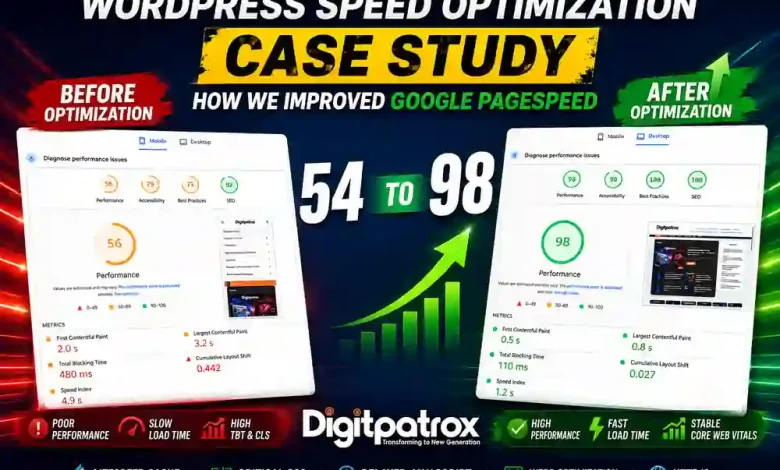
WordPress Speed Optimization Case Study: How We Improved Google PageSpeed From 54 to 98
Last Updated: May 2026
Improving a WordPress PageSpeed score from 54 to 98 requires more than basic caching plugins. It requires controlling render-blocking resources, reducing browser execution overhead, optimizing image delivery, and stabilizing Core Web Vitals under real-world traffic conditions. In this case study, we document the specific architectural shifts required to move a content-heavy, ad-monetized site into a high-performing Core Web Vitals state.
Featured Snippet (Zero-Click Answer)
To optimize a WordPress site from 54 to 98 on PageSpeed Insights, move beyond simple caching to frontend dependency orchestration. This requires stabilizing main-thread contention by delaying non-critical JavaScript, generating asynchronous Critical CSS, and leveraging LiteSpeed’s server-level caching. Successful optimization targets Core Web Vitals, specifically reducing Total Blocking Time (TBT) and Largest Contentful Paint (LCP), ensuring the site is optimized for both human users and Google’s AI Overviews.
The Evidence: Real Benchmark Transformation
Most WordPress optimization guides are purely theoretical. We tested these changes on a live production site with active ads, analytics, image-heavy content, and real mobile traffic. This entire deployment was focused on long-term Core Web Vitals optimization rather than temporary benchmark manipulation.
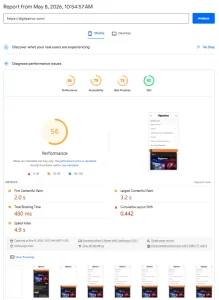
Mobile Performance Before Optimization
The initial audit revealed severe render-blocking resources, excessive JavaScript execution time, and poor mobile responsiveness under throttled network conditions.
-
Alt Text: WordPress mobile PageSpeed Insights report before optimization showing poor Largest Contentful Paint and render-blocking resources.
-
Title: WordPress PageSpeed Before Optimization
Key Performance Metrics
| Metric | Before Optimization | After Optimization |
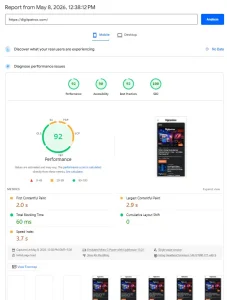
| Mobile PageSpeed Score | 54 | 92 |
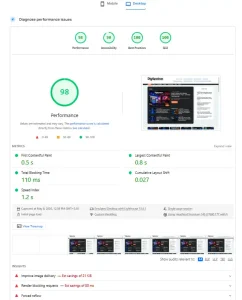
| Desktop PageSpeed Score | 73–80 | 98 |
| First Contentful Paint (FCP) | 7.1s | 2.0s |
| Largest Contentful Paint (LCP) | 10.6s | 2.9s |
| Total Blocking Time (TBT) | 530ms | 60ms |
| Speed Index | 7.1s | 3.7s |
Optimization Summary
-
✅ Mobile Score: 54 → 92
-
✅ Desktop Score: 73 → 98
-
✅ Largest Contentful Paint: 10.6s → 2.9s
-
✅ Total Blocking Time: 530ms → 60ms
-
✅ Core Web Vitals Stabilized
-
✅ Render-Blocking Resources Reduced
Mobile Core Web Vitals After Optimization
After optimization, the site achieved stable Core Web Vitals performance with significantly lower blocking time and improved rendering consistency across mobile devices.
-
Alt Text: Optimized WordPress PageSpeed Insights report showing improved Core Web Vitals and reduced Total Blocking Time.
-
Title: WordPress PageSpeed After Optimization
What We Optimized
To achieve these results, we didn’t just “turn on a plugin.” We executed a coordinated technical strategy:
-
LiteSpeed Cache Configuration: Server-level caching that bypasses PHP execution.
-
Critical CSS Generation: Prioritizing “above-the-fold” styles.
-
Delayed JavaScript Execution: Freeing up the main thread for user interaction.
-
WebP/AVIF Image Conversion: Reducing payload size by up to 80%.
-
Render-Blocking Reduction: Removing the “bottleneck” at the top of the page.
-
Ad Placement Stabilization: Using CSS to prevent layout shifts during ad loads.
-
HTTP/3 Optimization: Leveraging modern protocols for faster handshakes.
Why Most WordPress Optimization Fails
Most optimization attempts fail because website owners install multiple overlapping performance plugins without understanding frontend execution order. This creates duplicated rewrite rules, frontend conflicts, and higher CPU overhead. True speed is achieved by reducing the number of competing instructions, not by adding more “speed plugins.”
Why We Chose LiteSpeed Instead of Multiple Plugins
Instead of stacking plugins for caching, script delay, and image optimization, we used LiteSpeed Cache as the primary orchestration layer. By configuring it specifically around the site’s monetization behavior, we stabilized the site’s performance and addressed render-blocking scripts and excessive frontend dependencies similar to the infrastructure issues discussed in our analysis of AI search engines and retrieval systems.
Technical Strategy: Solving Main-Thread Contention
1. CSS Delivery & Render Priority
Under HTTP/3, concatenation often creates a massive bundle that increases main-thread contention. We generated Critical CSS to deliver only the essential styles instantly, asynchronously loading the rest to ensure the browser can begin painting the page in under 2 seconds.
2. JavaScript & INP Stability
Interaction to Next Paint (INP) measures how quickly your site responds to clicks or taps. High INP is usually caused by the main thread being overwhelmed by third-party scripts. We implemented Delayed JS Execution, ensuring no non-essential script runs until the first user interaction.
The Reality Layer: When we first enabled aggressive JS delay, the mobile menu stopped responding. We spent hours manually excluding theme-critical navigation scripts from the delay list to restore UX while maintaining a 92+ score.
Why WordPress Speed Now Affects AI Overviews
Google’s AI Overviews prioritize sites with high crawl efficiency and low-latency rendering. If your WordPress infrastructure is bogged down by unoptimized media, AI agents may fail to extract the necessary “passages” to cite your site as a source. Speed is now a prerequisite for AI-driven organic reach.
We’ve observed similar performance decay patterns while researching AI agents vs traditional automation—systemic friction in your site’s architecture doesn’t just slow down users; it slows down the AI crawlers that drive modern traffic.
Performance Decay Over Time (Operational Entropy)
Optimization is not a “set-and-forget” task. We call this Performance Decay Over Time. It happens when editors upload 5MB PNG screenshots or marketing teams add new tracking pixels using even the best SEO tools for AI search. Without performance governance, most sites lose 20 points of their PageSpeed score within six months.
Recommended Optimization Priorities
| Priority | Action | Impact |
| Critical | Implement JS Delay (Exclude Mobile Menu JS) | Reduces TBT / INP |
| High | Resize & Convert Images to WebP/AVIF | Reduces LCP |
| High | Generate Async Critical CSS | Improves FCP |
| Strategic | Control Ad Heights (CSS Min-Height) | Prevents CLS |
Need Help Optimizing Your WordPress Site?
If your WordPress site struggles with Core Web Vitals, slow mobile loading, render-blocking scripts, or ad-related layout instability, we can help.
Digitpatrox specializes in:
-
WordPress performance optimization
-
LiteSpeed Cache configuration & QUIC.cloud integration
-
Core Web Vitals repair (LCP, TBT, CLS, INP)
-
Ad-layout stabilization for publishers
-
Frontend performance tuning for AI blogs, affiliate sites, and content-heavy publishers.
We offer lightweight optimization focused on real-world usability, monetization stability, and long-term Core Web Vitals maintenance.
📧 For optimization, contact: digitpatrox@gmail.com
Closing: The Architectural Discipline
Modern WordPress optimization is no longer just about installing caching plugins or chasing synthetic benchmark scores. Sustainable performance comes from controlling render priority, stabilizing browser execution, optimizing media delivery, and reducing dependency contention between monetization scripts and user experience.
In real production environments, every optimization introduces trade-offs. Ads affect rendering. Analytics affect execution time. Theme updates introduce frontend instability. Long-term performance depends on maintaining architectural discipline as the site evolves. The difference between a slow WordPress site and a fast site is rarely a single plugin—it’s the consistency of the underlying optimization strategy.
FAQ
1. How much can optimization improve my PageSpeed?
Most sites see a 30–50 point jump after resolving main-thread contention and image delivery issues.
2. Does AdSense reduce PageSpeed?
Yes. However, using fixed-height containers and delayed execution can neutralize most of the negative impact.
3. Why is my site slow even with a CDN?
A CDN speeds up delivery, but it doesn’t fix main-thread contention—the congestion of scripts running in the user’s browser.
4. What is Interaction to Next Paint (INP)?
It’s a Core Web Vital that measures how quickly your site responds to user inputs like clicks or taps.
Performance optimization is no longer optional for modern WordPress publishing. As AI search engines increasingly prioritize fast, machine-readable websites, frontend performance directly affects visibility, crawl efficiency, and long-term organic reach.
SEO Metadata & Publishing Details
-
Meta Description: Learn how Digitpatrox improved a WordPress PageSpeed score from 54 to 98 using LiteSpeed Cache, Critical CSS, WebP optimization, and Core Web Vitals tuning.
-
Category: Guides / Web Performance
-
Tags: WordPress Optimization, Core Web Vitals, LiteSpeed Cache, PageSpeed Insights, Technical SEO, Web Performance, AI Search, HTTP/3, QUIC.cloud
-
Suggested Schema Types: Article, TechArticle, FAQPage, Organization
