

Royal Kludge L75 review: One of the best typing experiences on a budget
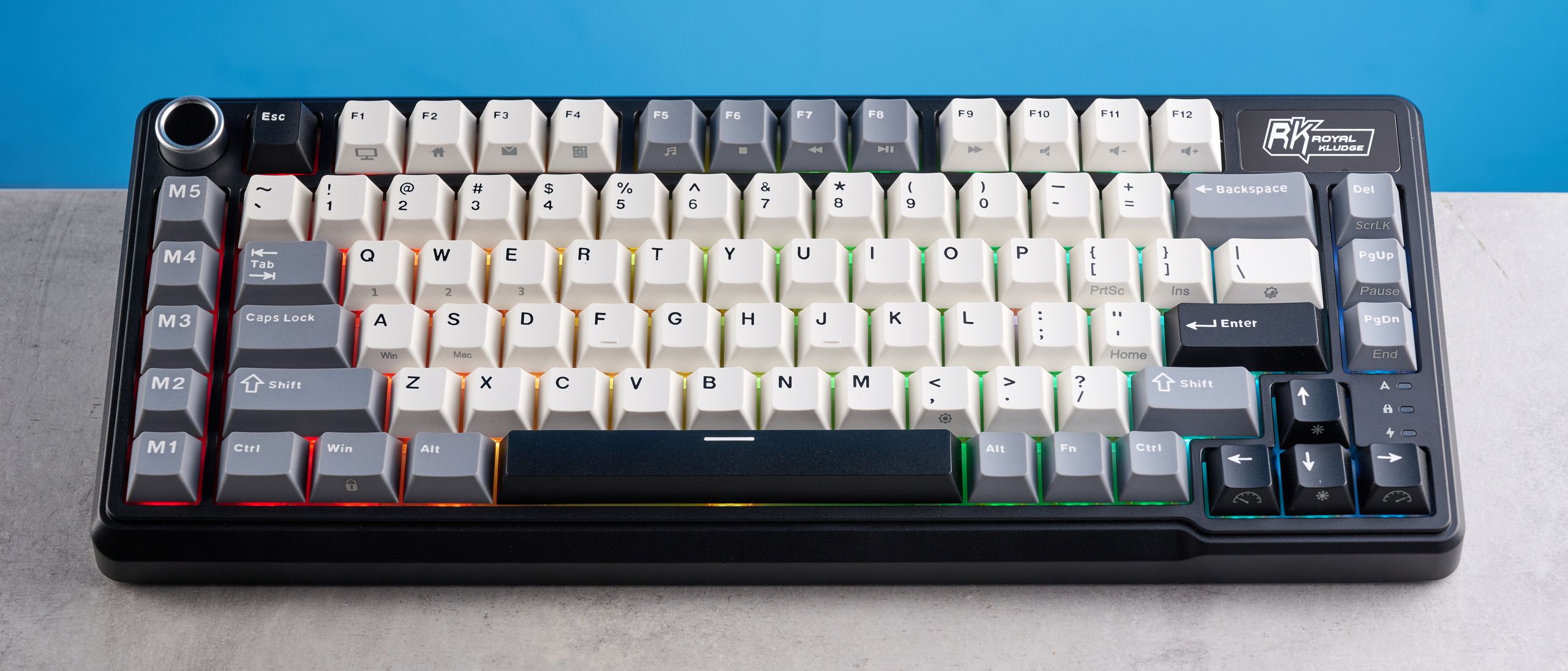
At the time of writing this, I’d tested and reviewed 75 of the best keyboards so when I say that the Royal Kludge L75 is one of the finest decks I’ve typed on, I mean it. Priced at just $79, the L75 is fitted with highly responsive pre-lubed switches that are a dream to type on.
The keyboard boasts a lovely sound profile too, and I love its dedicated macro keys that can be customized via web-based companion software. The cherry on top of the cake is the long, long battery life. But of course, when any product is priced that low, some compromises have to be made, and in the case of the L75, it’s the flimsy build quality.
Royal Kludge L75 review: Specs
|
Specs |
Royal Kludge L75 |
|---|---|
|
Price |
|
|
Switches |
Beige (tactile), Cream (linear) or Silent mechanical |
|
Keycaps |
Double-shot PBT |
|
Construction |
ABS plastic |
|
Mount |
Gasket |
|
Layout |
75%, 85 keys |
|
Operating system |
macOS, Windows |
|
Backlighting |
Per-key RGB |
|
Polling rate |
Not specified |
|
Paired devices max |
3 |
|
Connectivity |
Bluetooth, 2.4GHz dongle, wired |
|
Battery |
8,000mAh |
|
Measurements |
13.83 x 5.71 x 1.71 inches |
|
Weight |
2.18lbs |
|
Colors |
Knight Black, Mocha Brown, Olive Green, Lemon Green |
Royal Kludge L75 review: Cheat sheet
- What is it? A 75% mechanical keyboard with dedicated macro keys
- Who is it for? For hardcore typists and people who work at a computer all day long
- How much does it cost? The Royal Kludge L75 is available for $79 / £79
- What do we like? The excellent typing experience, long battery life, dedicated macro keys, web-based companion app, and affordable price tag
- What don’t we like? The flimsy build quality
Royal Kludge L75 review: The ups
From its delightful sound profile and lovely typing experience to its web-based software and long battery life, the Royal Kludge L75 is a stupendous mechanical keyboard.
Delightful sound profile
Straight out of the box, the Royal Kludge L75 offers a beautiful typing experience and boasts a lovely, creamy sound profile — that will, of course, depend on the switches. The keyboard comes with a few stock switches which you can choose at checkout: Beige tactiles, Cream linears, and Silent ones. I tested the Cream linear mechanical switches and I absolutely adore them.
The L75 utilizes a gasket-mount design which provides a cushioned typing feel and also reduces vibrations from key presses. It’s also packed with five layers of internal padding, including two layers of thick sound-absorbing foams, an IXPE switch pad, silicone dampener and PET sound-enhancement film. All of this is to say that the L75 does an excellent job at minimizing hollow sounds, and in my testing, my immersion was never broken by unwanted or unpleasant metallic pings.
As I mentioned earlier, I tested the Cream linear switches. The switches, combined with the gasket-mount design, five layers of sound dampening and double-shot PBT keycaps, deliver a creamy acoustic profile which, honestly, sounds like music to my ears. I love it as much as I love the Wobkey Rainy 75 Pro’s ($139) thocky sound profile — which is a lot.
Excellent typing experience

So, the Royal Kludge L75 sounds great, but is it just as good to type on? It’s a hoot! The Cream linear switches I tested require a moderate 45g of force to activate and they have a pre-travel distance of 2mm. These are heavier than what I usually prefer, such as the 35g Sea Salt on the Epomaker RT100 ($115) but even so, I didn’t find the Cream linears fatiguing to type on.
Also, the L75 is hot-swappable and compatible with 3- or 5-pin mechanical switches, so you can always change them for lighter ones without de- and re-soldering them to the PCB. Or just buy the Silent switches at checkout, which require 37g of force to activate. At least the Cream linears aren’t as heavy as the 57g Banana switches on the Keychron V1 Ultra 8K ($119).
I also appreciate the L75’s double-shot PBT keycaps which are resistant to oil and general wear and tear, especially compared to their ABS counterparts. Even though this is a budget keyboard, it’s nice to see high-quality keycaps on it, especially when some expensive boards utilize cheap-feeling ones, such as the Turtle Beach Vulcan II Max ($229) and the Razer Pro Type Ultra ($159).
To see how the L75 fared against other mechanical keyboards I’d tested right before it, I took a typing test at 10fastfingers.com. As you can see from the table above, my speed was faster than average while maintaining slightly above average accuracy too. I’m very pleased with the result.
Dedicated macro keys

Alongside the outstanding typing experience, the Royal Kludge L75 is great for productivity for another reason: its dedicated macro keys. Similar to the pricier Keychron Q65 Max ($209), there’s a set of macro buttons located on the L75’s left-hand side. These five keys can be customized via the companion software (more on that soon) and you can assign shortcuts to them to enhance your workflow.
For instance, I use Paste Special a lot when I’m working in Google Docs, so instead of pressing Cmd + Shift + V every time, I assigned this chain of commands to M1. This added a boost to my workflow. Alongside the macro keys, you also get a full row of Function keys thanks to the keyboard’s 75% layout which also adds to the productivity aspect of the L75. Located in the top-left corner is a metallic volume knob which also saves you some time when you want to increase/decrease your music’s volume or play/pause playback.
Overall, the L75 is an outstanding productivity keyboard. Of course, as a 75% TKL keyboard, you miss out on a number pad. If that’s important to you, consider full-size or 96% keyboards, such as the Epomaker RT100 or the Epomaker Cypher96 ($89).
Long battery life

If you’re looking for a keyboard that doesn’t easily run out of charge, the Royal Kludge L75 is perfect for you. First of all, there are three ways to connect the keyboard to your Windows or macOS machine: 2.4GHz wireless, Bluetooth, and wired. If you’re using the keyboard wirelessly, you’ll be pleased to hear that it’s packed with a massive 8,000mAh battery. This is even bigger than the battery packs you’ll find in the L75’s stablemates. Both the Royal Kludge S98 ($99) and the Royal Kludge M75 ($99) pack 3,750mAh batteries only.
Royal Kludge says that the L75 can last up to 700 hours between charges, which is incredible. This is, of course, with the RGB turned off, so your mileage will vary depending on usage conditions. According to Royal Kludge, the L75’s battery life drops to a mere 60 hours with the RGB on. I wasn’t expecting such a big discrepancy, to be honest.
But hey, the battery life with RGB turned off lasts even longer than the pricier Keychron V1 Ultra 8K’s ($119) 660-hour rating. It’s also better than pricier keyboards. For instance, the Razer Pro Type Ultra lasts just 214 hours, while the Corsair K65 Plus for Mac ($179) has a 266-hour battery life, so there’s that.
Web-based companion software
Image 1 of 2


There are two ways to customize the Royal Kludge L75. You can either download the proprietary software onto your Windows machine, or you can use the web-based app on either Windows or macOS. I tested both but I prefer the latter, as it enables me to customize the L75 using my work-sanctioned MacBook Air M2 (I need to get IT to authorize any downloads, you see).
To customize the L75 via web-based software, you need to plug it into your laptop/computer via the included USB-C cable, and launch RK Driver Hub in Google Chrome, Edge or Opera — support for more browsers is being added, at the time of writing. This worked like a charm in both Google Chrome and Edge in my testing, on my MacBook and the Dell Alienware 16X Aurora.
Image 1 of 2


Both the downloadable software and the web app provide the same functionality and degree of customization. You can use these to remap the keys, record macros and assign them to the macro keys, update the L75’s firmware, adjust the RGB lighting and effects, and customize the touch-sensitive nameplate. Yep, the L75’s got a touch-sensitive nameplate which I’ll elaborate on soon.
Affordable

The cherry on top of the cake is that the Royal Kludge L75 is an affordable mechanical keyboard, and it doesn’t break the bank. The L75 has a retail price of $79 / £79 at Amazon, and I’ve seen it drop to $61 / £65 in the past during sales events, such as Black Friday. It’s cheaper than the Royal Kludge M75 ($99), the Keychron V1 ($94), the GravaStar Mercury K1 Lite ($89) and the NuPhy Air75 V3 ($139).
If you aren’t bothered by the flimsy build, which I’ll discuss next, and just want a cheap and cheerful productivity mechanical keyboard, you’ll enjoy the L75. It’s one of the best typing experiences I’ve had so far.
Royal Kludge L75 review: The downs
There isn’t much wrong with the Royal Kludge L75, but its biggest drawback is its flimsy build quality.
Cheap build

One of the Royal Kludge L75’s biggest drawbacks is its cheap build quality. The keyboard is made entirely of ABS plastic which isn’t inherently a bad thing, but it leaves a lot to be desired. For instance, if you hold the keyboard by its sides and twist it, it does indeed twist. This is something I’ve experienced with other plastic keyboards as well, such as the Keychron V1 Ultra 8K and the Epomaker EK68 ($89).
In a similar vein, if you press the keys too hard, the whole PCB mount dips. To a degree, this is fine as it’s symptomatic of the gasket mounting and allows for a bouncy type feel. But when a PCB is dipping and bending to this degree, I worry about the L75’s structural integrity and longevity. If this is something that really bothers you, I’d recommend the Keychron V1 or the Epomaker Ajazz AK820 Pro ($68).

My biggest issue, however, is with the nameplate located in the top-right corner. According to Royal Kludge, this is a touch-sensitive nameplate which can be customized via either the web-based app or the downloadable software, and it can be used to execute certain commands, such as launch the Royal Kludge website (by default). In theory, it sounds great, and it’s something I was looking forward to testing.
Alas, I couldn’t, because when I removed the protective masking film off it, the nameplate came off too. I could then see that glue had been used to stick it to the keyboard, which left me very confused by the whole ordeal. I’ve reached out to a Royal Kludge representative to get to the bottom of this, and see if they can send me a replacement to properly test the touch-sensitive aspect of it. I will update the review as and when I hear back.
Royal Kludge L75 review: Verdict

If you’re looking for a mechanical keyboard for productivity and you’re on a budget, I’d highly recommend the Royal Kludge L75. It’s an absolute delight to type on, thanks to the responsive switches and the lovely double-shot PBT keycaps. Its set of dedicated macro keys are highly customizable via web-based companion software, and I love the keyboard’s long battery life too.
While there isn’t much wrong with the L75, it’s important to note that the build quality is underwhelming as the keyboard’s body twists, and the touch-sensitive nameplate is prone to falling off (as it did in my testing).
For those who just want a solid typing experience and long battery life, the L75 is the way to go.
Source link
