

Shure MV88 USB-C review: My go-to voiceover mic from here on out
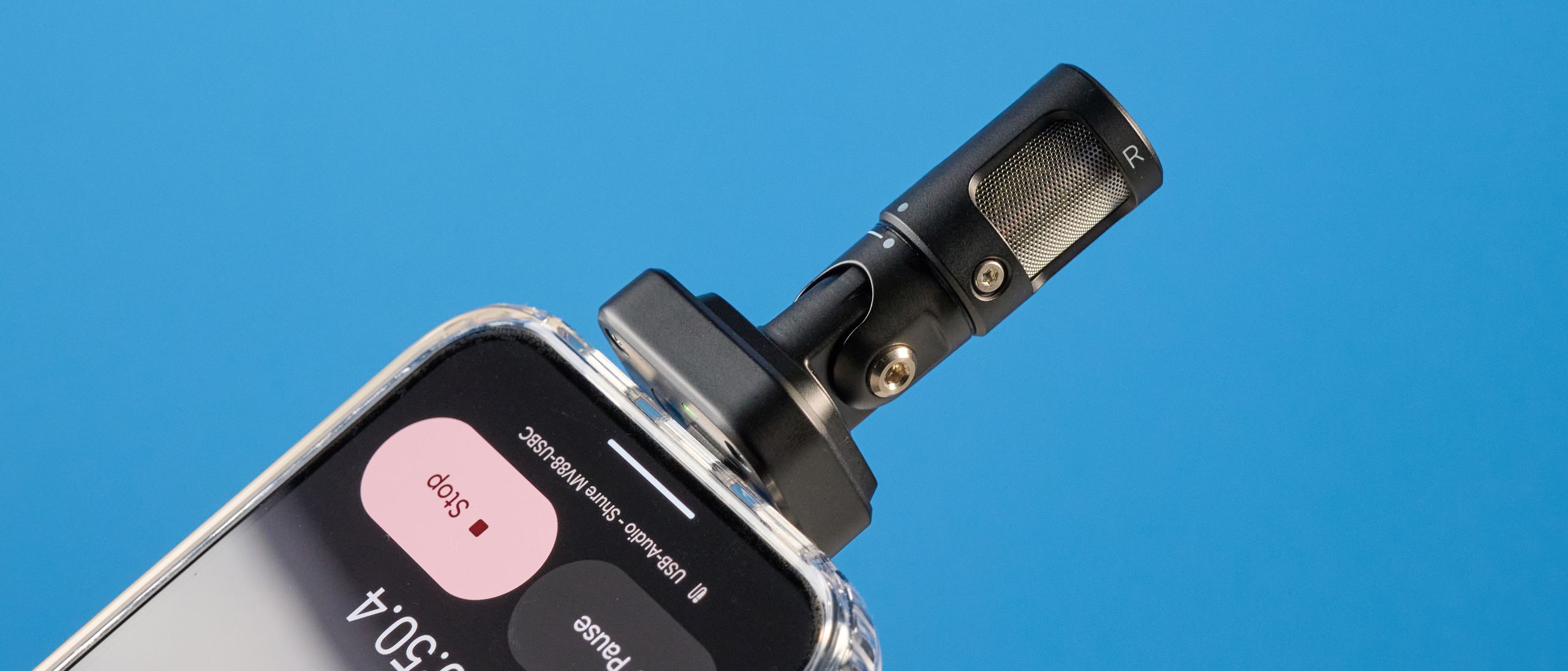
Shure has done it again: it’s made one of the best microphones. The MV88 USB-C is a streamlined version of the MV88+ that came out last year. Intended to be used for phone-forward content, the MV88 USB-C plugs directly into your cellphone’s USB-C port for instant connectivity.
You can customize tons of features in the Shure Motiv Audio app, like ambient noise reduction, adjust your polar pattern, and even utilize the plenty of presets for music and speech alike. The MV88 USB-C simplifies everything.
As it’s geared towards beginners, Shure’s thought of it all. Want to record vocals? Use the ‘singing’ preset. Music? ‘Band’ preset. Voiceovers? You’ll want ‘speech.’ This doesn’t have to be a daunting mic — simply plug it in, and you’re good to go. Find out the full story in my Shure MV88 USB-C review.
Shure MV88 USB-C review: Cheat sheet
- What is it? A compact USB-C only mic
- Who is it for? Phone-only content creators
- What does it cost? $159 / £145
- What do we like? The sound quality is unbeatable
- What don’t we like? The muff is super delicate
Shure MV88 USB-C review: Specs
Shure MV88 USB-C review: Price & availability
The Shure MV88 USB-C microphone is available for $159 from B&H Photo Video and other retailers in the U.S. and £145 in the U.K. from Shure direct.
There have been a few iterations of the ‘MV88’ model, so I’ll quickly go over the differences. You’ve got the premium Shure MV88+, which is a mic and receiver kit. This model doesn’t plug directly into your phone — you need to use it wirelessly with the Shure Motiv Audio or Video app if you don’t buy the additional receiver (an extra $150).
You’ve also got the MoveMic Two, which are your traditional lav mics for on-the-go interviewing and reporting.
For content creators, though, I’d recommend the MV88 USB-C over the MoveMic Two. If you want the best of the best, then it’s gotta be the MV88+ thanks to its versatility — you can use the mic away from your recording device — but if you’re going to be filming directly to your phone and you’re on a budget, you may as well save your money with the MV88 USB-C.
Shure MV88 USB-C review: Design & controls

- Super small, just 1-inch wide
- Controls in the Shure Motiv Audio app
- Clips into phone just like a shotgun mic on a camera
I’ve seen lavalier mics that connect to your phone’s USB-C port, but the Shure MV88 USB-C is unique in that it’s just one mic. The microphone itself kind of behaves like a camera shotgun mic — as in, you connect to the recording device and the mic sits on that device — which is ideal for phone-forward content creators.
As the mic is just 1 inch wide and 2.7 inches long, it’s the ideal mic to throw in your bag before a day of filming. Honestly, the carry case is small enough that you could keep it in your backpack or purse, and it wouldn’t take up a noticeable amount of space at all.
The mic also comes with a detachable muff. You can remove this by twisting the muff to the side and easing it over the microphone capsule. However, this muff is very delicate — when we were simply photographing the mic, the muff tore at the base. I’d recommend not touching the muff once it’s on, to save from accidentally ripping it.
You can buy a second windscreen/dead cat on Shure’s website for around $20, but I wouldn’t bother with this unless you’re recording in an extraordinarily windy location. Just use the provided muff. And try not to rip it.
Unfortunately, all of the controls are locked behind the Shure Motiv Audio or Shure Motiv Video apps, which I’ll discuss in full in the App section below. You can’t activate or deactivate any features without the app, which is to be expected at this point.
Shure MV88 USB-C review: Features & connectivity

- Plug-and-play USB-C design
- High-pass filter, compressor, Denoiser, auto level in-app
- Customizable polar patterns
As you might expect from the name, the Shure MV88 USB-C is connected via the built-in USB-C jack. You cannot connect the mic any other way. It’s a miniature plug-and-play. Think the on-the-go version of the MV6.
Also as you might expect from a Shure microphone, the MV88 USB-C is stuffed with tons of great features. You’ve got the classic digital Denoiser, which remains one of the best ambient noise reduction features I’ve ever used. There’s also a high-pass filter — you can choose from 75Hz or 150Hz — which is intended to be used to minimize HVAC noise.
There’s also a compressor which reduces the dynamic range for easier listening, and a limiter, which prevents sounds from going over a certain threshold and clipping. These are all mandatory features for a high-quality content creation mic.
I tested the limiter by screaming — yes, screaming — into the microphone. This didn’t clip at all, which was majorly impressive.

You can also adjust the polar pattern, but there are some drawbacks. If you use anything other than the cardioid pattern, you can’t use the Denoiser. So, if you’re field recording, you might want to use raw mid-side. Just remember to switch back to cardioid if you’re doing an interview on the side of a busy road; otherwise, your audio will be marred by pervasive ambient interference.
Adjusting the polar pattern is pretty integral for a one-mic-does-everything product, and is a common sight on Shure mics like the aforementioned MV88+.
If all this talk of polar patterns and compressors and limiters is going over your head, don’t worry. Shure also has a collection of presets in the Motiv Audio app: speech, singing, flat, acoustic, and band. Each preset automatically adjusts things like EQ, limiter, and high-pass filter, so you don’t have to worry about doing it manually.
As this is a beginner-focused mic, for now, I would recommend cycling through these presets and choosing one you like. Just remember — if you want to record in a loud area, make sure you switch to cardioid, otherwise the Denoiser won’t work.
Shure MV88 USB-C review: App
- Shure Motiv Audio app
- Also Shure Motiv Video app!
- Some playback issues
As with the Shure MV88 USB-C+, which I reviewed last year, the MV88 is compatible with Shure’s Motiv Audio and Motiv Video mobile apps. You can also record directly into your phone’s camera, which is a major upgrade from last year’s MV88+, which required recording via Shure Motiv Video if you didn’t have the $150 receiver addition.
The MV88 also works with the desktop Motiv Mix app, but I’m not sure why you’d ever use it with a computer — the mic is so small that it will only work well with a phone.
As this is primarily an audio recording device, I’ll discuss Shure Motiv Audio. You have to toggle the features, polar patterns, and sound presets via the Audio app. You cannot do this natively from your phone. While, yes, this is annoying, it’s also pretty much standard on wireless mics.
Here are a few screenshots from the Shure Motiv Audio app.

My biggest gripe with the Motiv Audio app is that you can’t play recordings back in the app. You have to either export them to your camera roll, to Google Drive, AirDrop to your laptop, and so on and so forth. Obviously, you can use the app to toggle on your desired settings and then record directly into your editing software or voice notes, but this is still disappointing for such a premium product.
I initially had issues playing back audio files in the app, but after deleting and re-downloading the app, this issue went away. If you’re experiencing similar bugs, I’d recommend doing that.
Shure MV88 USB-C review: Audio quality

- Gorgeous, warm vocal reproduction
- Intense yet natural-enough-sounding Denoiser
- Handles sibilance and plosives well
If you’re familiar with Shure products, you’ll know that they all sound great. Shure is the master of microphone tech, and for good reason. I’ve yet to test a Shure mic that sounds bad.
The MV88 USB-C is no different. Considering this is such a tiny, affordable, straightforward mic, you might expect some sacrifices in terms of sound quality. You’d be wrong. My voice sounded rich and warm in every single clip. When I was listening to my recordings, I thought to myself, “Damn, I sound gooood.”
With a condenser capsule, the MV88 captures every nuance in voices, and is a great field recording device too with the raw mid-side enabled. As always, I put the MV88 USB-C through my standardized audio tests.
Standardized audio testing

I tested the MV88’s ability to handle pops, hisses, and ambient noise performance. I also recorded a condensed version of my verdict below, which you can listen to here.
Plosives
If you aren’t sure what a “pop” or “plosive” is, I’ll quickly explain. “Plosive” sounds refer to hard consonant sounds — ‘P,’ ‘B,’ ‘D,’ etc — which can often manifest as popping sounds when recorded.
To test the MV88 USB-C, I recorded myself saying a series of ‘B’ and ‘P’ heavy tongue twisters.
As you can hear, the MV88 USB-C minimizes harsh popping sounds. The clip is easy to listen to, and doesn’t have me wincing or turning the volume down due to undesired pops.
Fricatives/sibilance
If you’re not sure what a “fricative” or “sibilant” sound is, it’s basically softer, hissy consonants. Think ‘F,’ ‘S,’ ‘SH.’ These sounds can often manifest quite harshly in recorded audio.
As you can hear, there is one moment where my voice almost crashes against the microphone. However, the mic handled the rest of the sibilant sounds really well.

Ambient noise performance
Denoiser only works with ‘Mono cardioid’ enabled. If you’re using any of the other audio modes — like ‘Raw mid-side,’ ‘Stereo,’ or ‘Mono bidirectional,’ you won’t be able to activate the Denoiser. This makes complete sense, as if you’re recording from both capsules, the mic will struggle to separate ambient and primary sound.
I was pretty impressed with the MV88 USB-C’s ability to minimize ambient noise. Take a listen to this clip.
As you can hear, my voice is isolated well. Obviously, there’s a touch of harshness to my voice, but this is a given when using really strong ambient noise reduction. The mic did a fantastic job of eradicating the loud sirens and cars in the second half of the track, and pretty much obliterated all café noise in the first half of the track.
Here’s the same clip without the Denoiser activated.
As you can hear, the sirens and traffic noise are much, much louder without the Denoiser. There are a few moments where my voice grows a little grating, and it sounds like the ambient noise might drown me out.
Overall, the Denoiser works fantastically, and I’d have no doubts about using this mic on busy city streets.
Shure MV88 USB-C review: Verdict

I would recommend the Shure MV88 wholeheartedly for content creators looking for a versatile, easy-to-use microphone to upgrade video content — or even just voiceovers. As this is a compact mic that plugs directly into your phone, don’t think this could replace one of the best podcast mics like the Shure MV6 or MV7+. The MV88 USB-C is only for mobile content creation.
You could use it for vox pops, interviews (although you’d have to get quite cozy!), but I think it excels mostly for social video voiceovers. Simply plug it into your phone and you’re good to go.
With hi-res audio recording — 24-bit WAV files as default in the Shure Motiv Audio app — this is one of the cheapest ways to upgrade your social content without a headache. The MV88 USB-C is a game-changer for content creators. It’s my go-to voiceover mic from here on out.
Source link
