
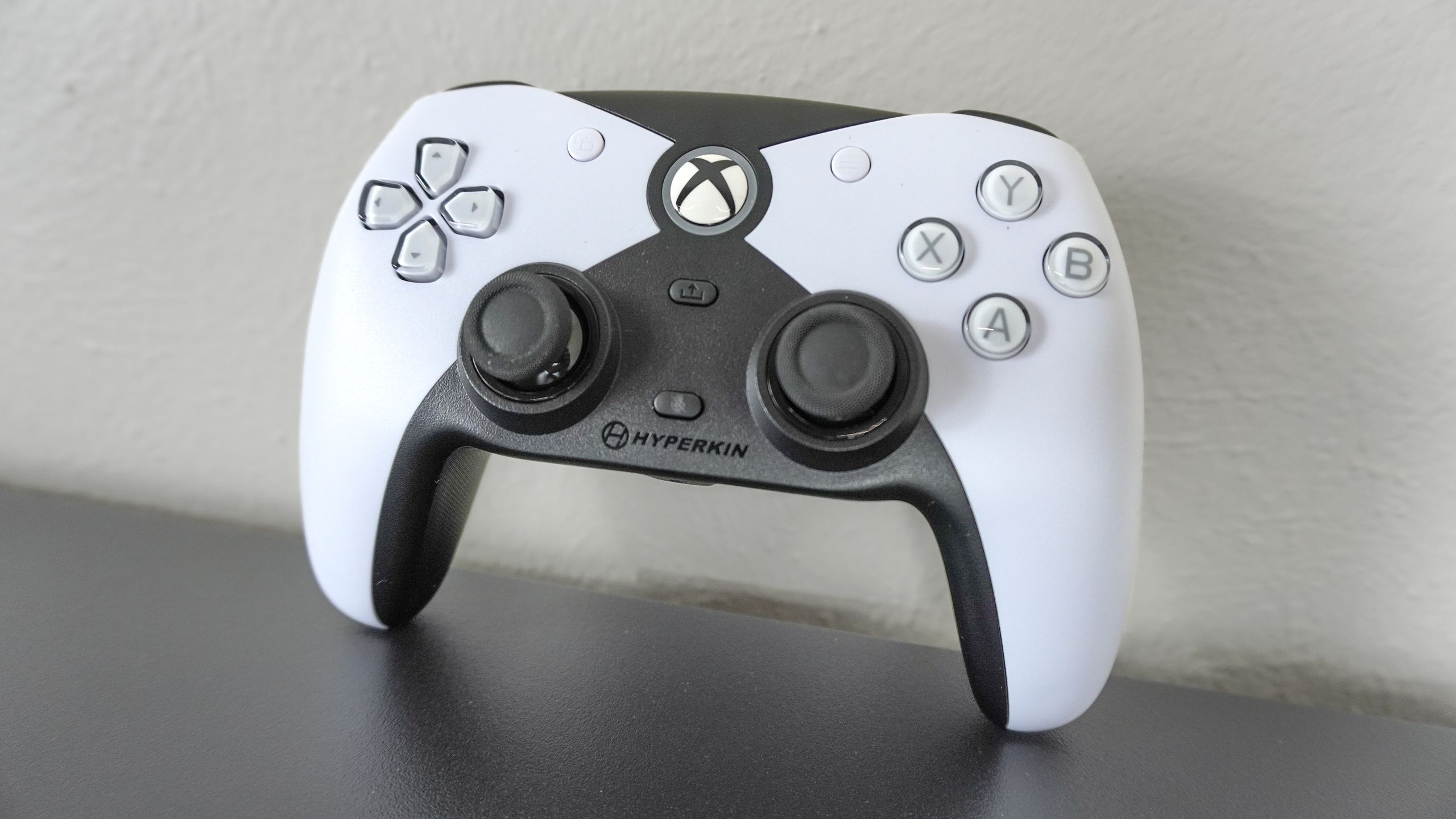
Deciding between PlayStation or Xbox might seem like a no-brainer for some, but for others, it’s a more difficult choice. From the hardware to the games, subscriptions, and accessories, there’s a lot to consider when choosing one gaming ecosystem over the other. However, there’s one key preference that immediately sets each console apart: staggered or symmetrical thumbsticks.
Since the launch of its DualShock Controller for the original PlayStation, one thing hasn’t changed with Sony’s controllers throughout the years: their symmetrical thumbsticks. On the other hand, Microsoft took a different approach with its staggered thumbsticks, which have remained a core part of the Xbox experience in the same way.
If you grew up using one layout, chances are, you likely had a difficult time getting used to the other. One of the reasons I’ve always preferred playing on my gaming PC is that you’re not limited to one controller layout and have plenty of options to choose from among the best PC game controllers.
After almost a year, though, I finally had a chance to try out one of my most anticipated Xbox controllers. Unlike Hyperkin’s modern remakes of classic Xbox controllers, such as The Duke and The Xenon, The Competitor features a brand new design that gives you the look and feel of Sony’s DualSense for the PS5, but with a few pro-level features added to the mix.
Here’s why the Hyperkin Competitor is not just another symmetrical controller for Xbox but an excellent pro-level hybrid that finally convinced me to put down my 8BitDo Pro 2.
From staggered to symmetrical
If you saw the Hyperkin Competitor lying down on a table or a desk from far away, you would probably think it’s a DualSense controller for the PS5. While there’s also an all-black version, this two-tone black and white one definitely gives off DualSense vibes at first glance. However, instead of a touchpad above its symmetrical analog sticks, the black and white meet in the top center of the controller to form an “X” with an Xbox button in the middle.
In the box, you get the controller itself and a 10-foot detachable USB-C cable. You don’t get a case or swappable thumbstick caps as this is a $50 controller after all. I wouldn’t go as far as to call it a pro controller though, since it’s wired and not wireless due to Microsoft’s restrictions and extra licensing fees. Instead, the Hyperkin Competitor is a wired Xbox controller with some pro-level features like its Hall Effect joysticks to help prevent stick drift and the metal anti-friction rings around them for a smoother overall feel.


Instead of the thinner and shorter triggers on Microsoft’s Xbox controller, the Hyperkin Competitor fully leans into Sony’s wider and longer triggers. One big difference between it and the DualSense controller though is that its bumpers are smaller and are sort of a mix between Sony’s and Microsoft’s respective designs. There’s a USB-C port in the middle and while it isn’t flush like the one on the DualSense, it isn’t restrictive so you can use any USB-C cable you want.
While I certainly would have preferred if this was a wireless controller, I do like that I can use any of the USB-C cables I have on hand. For instance, the Hyperkin Competitor ships with a PVC cable, so I swapped it out for a more premium-feeling braided fabric one that’s also flexible. Like basically every other Xbox controller, you can also use this one on your PC.
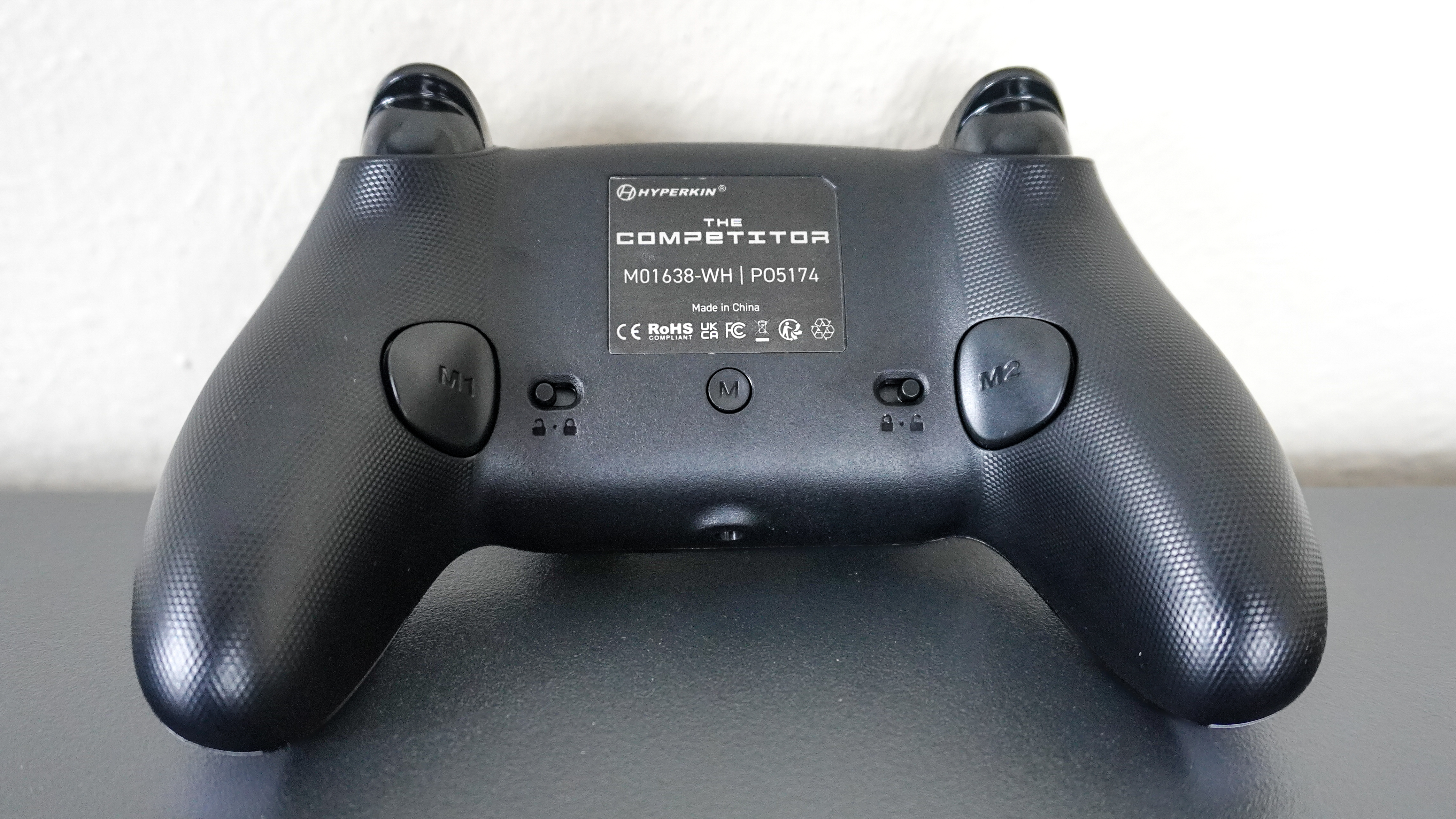

Around back is where things get a bit more interesting. While Hyperkin stayed true to the original design of Microsoft’s Duke controller for the original Xbox and its Xenon controller for the Xbox 360, here, the company had a chance to experiment. As such, it added two remappable back buttons on either side of the Competitor and this is a feature I’ve always wanted in a Hyperkin controller, which made waiting almost a full year for this one worth it.
You can remap these back buttons on the fly by pressing the “M” button in the middle of the controller between its two trigger lock toggles on either side. You also get a 3.5mm audio jack in the center of its handles for using one of the best gaming headsets while playing on your Xbox.
From its reveal, I was really excited to try out the Hyperkin Competitor for myself and after finally getting my hands on it, I couldn’t wait to put it to the test in my go-to Xbox game.
A PlayStation-like Xbox experience

Given that the Hyperkin Competitor is a wired controller after all, you get a plug and play experience right out of the box with no extra configuration needed. I plugged it into my white Xbox Series X, pressed the Xbox button in the center and it sprang to life. To make dealing with its wire easier, I ran it from the back of my Xbox and up from the center compartment of the Corsair Platform 4 standing desk I’m currently using for gaming in my office.
Everything felt smooth and while it’s not an exact replica of Sony’s DualSense controller, its D-pad does feel pretty much the same. In addition to having Xbox branding, its face buttons are slightly smaller and have a bit more travel to them than the ones on the DualSense. The metal anti-friction rings around the Competitor’s thumbsticks really do make a difference and when paired with the controller’s magnetic Hall Effect sensors, I preferred using it over both the DualSense and the Xbox controller as my movements felt more precise.
Despite having grown up with Nintendo, then PlayStation, and finally Xbox, and generally preferring staggered thumbsticks for shooters, RPGs and action games, there is one major exception: skateboarding games. One of the first games I picked up when I got my Xbox Series S was Skate 3 but I quickly went back to playing SkaterXL before moving on entirely to the skateboarding sim Session.
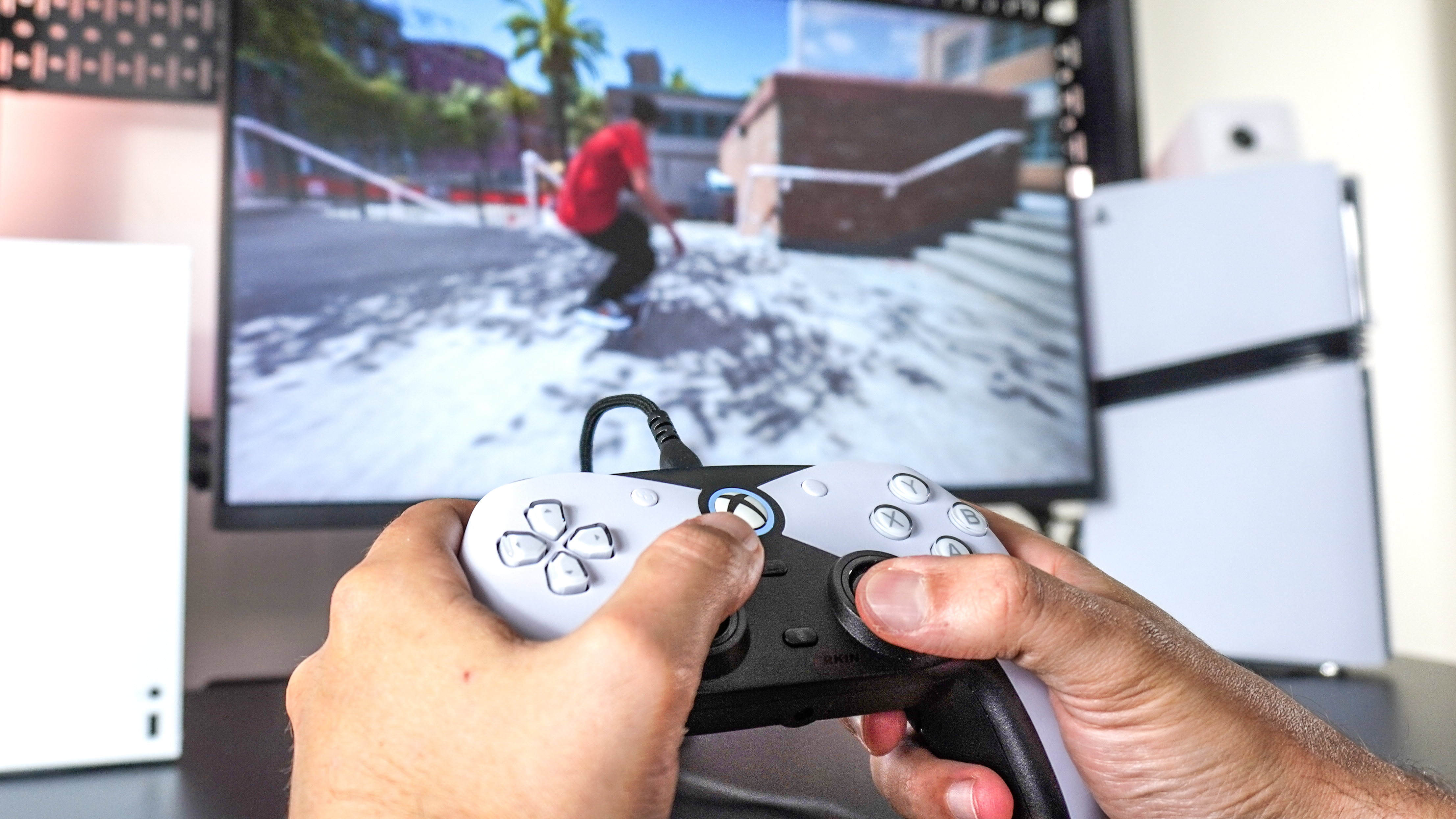

On the Xbox Series X though, Session looks even better. I have it on PlayStation and PC as well (got to support the developers when you really love a game right) but I keep coming back to playing Session on my Xbox. While Xbox fumbled the ball in the console war this generation, Quick Resume is a real innovation and one of the best new features to come to any game console since Microsoft added a hard drive to the original Xbox.
Whether I’m skating around the Brooklyn Banks or the Jerome Banks in New York City, Love Park or FDR in Philadelphia or Hollywood High and the surrounding schoolyard in LA, what I love about playing Session on Xbox is that I can jump right back in where I last left off, even after a power outage. I know most people prefer playing on the couch with a wireless controller in hand but as I often play at my desk, I don’t mind using a wired controller like the Hyperkin Competitor. Not only do I not have to worry about charging it but with Quick Resume, I can get a quick session in when I have a few minutes here and there (no pun intended).
Up until now, I had been using the 8BitDo Pro 2 to do the exact same thing on my Xbox. Like the Competitor, it also has Hall Effect thumbsticks and is a wired controller. However, compared to its more SNES-like design, I actually really prefer how the Competitor’s shape draws inspiration from the DualSense.
In a league of its own
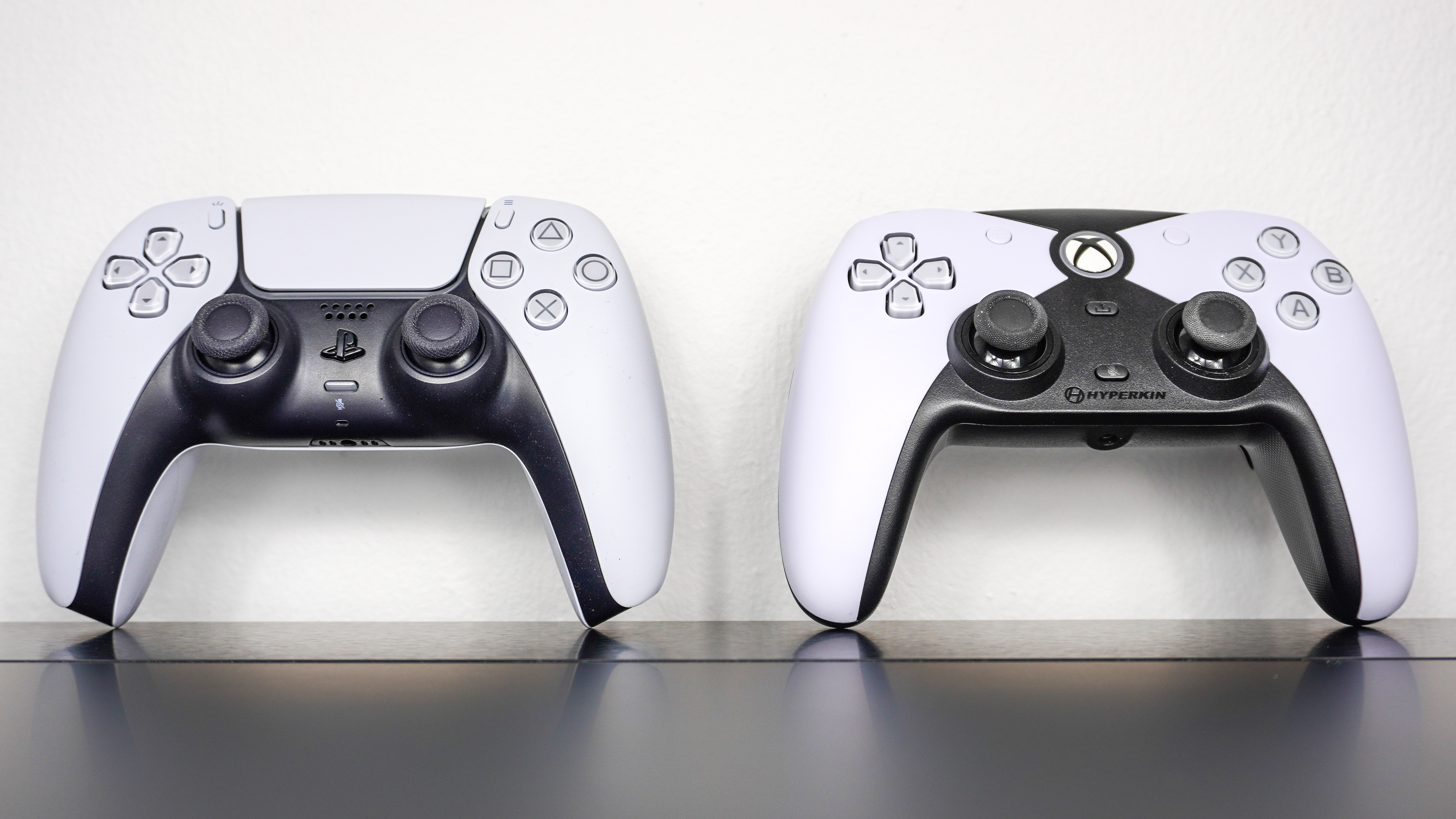

Side by side, the Hyperkin Competitor really does look quite like a DualSense controller with just enough changes throughout its design that it’s not a one-for-one clone. Even though the DualSense is packed with more tech inside and is fully wireless, the Competitor packs in a few additions that really help it stand out. These include its Hall Effect thumbsticks, metal anti-friction rings and my favorite, the remappable buttons around back.
In a game like Session where most of its controls are mapped to the thumbsticks, I like remapping its back buttons to A and X as you use these ones to push while riding in regular or goofy stance. That way, I never have to take my thumbs off the thumbsticks and can play the game without almost ever having to reach over to its face buttons.
I know my controller preference for one game in particular is incredibly niche. However, a controller like the Competitor with symmetrical joysticks could be an easy way for PlayStation players to ease themselves into playing on Xbox. The option to have symmetrical thumbsticks on your console of choice is a valuable addition to the Xbox ecosystem, especially for gamers who rely on that layout.
Now would I call the Hyperkin Competitor a perfect controller? Probably not and the reason for that is that in 2025, the option to use it wirelessly would have been great. I know that would have driven up the price due to Microsoft’s licensing fees to use its wireless tech but still, I’d definitely pay a bit more for a Hyperkin Competitor Pro with wireless functionality.
If you’re looking for a well-built, third-party Xbox controller with symmetrical thumbsticks and a few pro-level features for just $50, which is significantly less than both the Xbox Wireless Controller and the DualSense, you can’t go wrong with the Hyperkin Competitor but take it from me, it’s better if you game at your desk instead of on the TV.


Follow Digitpatrox on Google News and add us as a preferred source to get our up-to-date news, analysis, and reviews in your feeds.
More from Digitpatrox
Source link
-

-

-
-

-


