

Why Smartphone Batteries Degrade Over Time (And Why Phones Die at 20%)
The physics behind lithium-ion aging, voltage sag, fast charging, and why modern smartphones drain more power than ever.
Why Smartphone Batteries Degrade Over Time (And Why Phones Die at 20%)
You’ve probably seen this already: a two-year-old phone that sits at 17% for twenty minutes, then dies instantly the moment you open the camera.
It feels like planned obsolescence, but the reality is much more mundane. Smartphone batteries die faster as they age because of a physical limitation in lithium-ion chemistry, combined with an operating system that increasingly refuses to sleep.
Most of the problem comes down to physics rather than software tricks. The baseline power required to run a modern smartphone has outpaced the slow, incremental improvements in battery density.
Here is what is actually happening inside your device, and how to calibrate your expectations.
What Changed in the Last Five Years?
To understand why your battery feels worse today than it did a few phone generations ago, you have to look at the power budget. The hardware and software have changed dramatically, but the battery technology has mostly stood still.
-
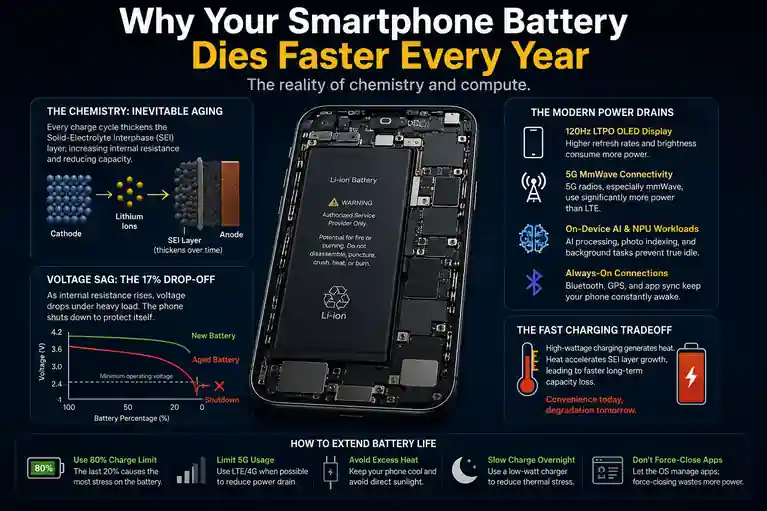
Displays got brighter and faster: We moved from 60Hz screens peaking at 800 nits to 120Hz LTPO OLED displays pushing 2,000+ nits outdoors.
-
5G radios became standard: 5G modems-especially mmWave-require substantially more power to maintain a connection and poll cell towers than LTE networks did.
-
AI moved on-device: Predictive text, photo indexing, and background natural language processing now happen locally on the phone’s Neural Processing Unit (NPU) rather than in the cloud.
-
Battery chemistry barely moved: Energy density in standard Lithium Cobalt Oxide (LiCoO2) batteries improves by only a few percent each year.
Because manufacturers can’t easily make the batteries larger without making the phones too heavy, they rely on software management to bridge the gap.
The Chemistry: Why the “17% Drop-Off” Happens
Batteries don’t just “hold less charge” over time. They physically degrade.
Every time you charge and discharge your phone, lithium ions move back and forth between the anode and the cathode. Over time, this chemical reaction creates a microscopic layer of buildup called the Solid-Electrolyte Interphase (SEI).
Over time, the battery develops microscopic resistance inside the cell itself. The chemistry still works-just less efficiently every year. According to testing data from sources like Battery University, a standard lithium-ion cell typically loses about 20% of its original capacity after 300 to 500 full charge cycles. Apple officially rates modern iPhone 15 and 16 models to retain 80% capacity at 1,000 cycles under ideal conditions, while iFixit’s battery teardown guides routinely show older models hitting that threshold much sooner.
As this internal resistance goes up, the battery struggles to deliver power quickly. This is called voltage sag. When your degraded phone is at 17% and you open the camera app (which requires a sudden spike of CPU and sensor power), the battery’s voltage drops below the minimum threshold required to keep the hardware running.
The phone’s power management controller shuts the device down once the voltage falls below safe operating levels. That is the abrupt death you experience.
Why Battery Percentages Become Unreliable
If you’ve noticed your battery percentage hanging at 20% for ages and then suddenly nose-diving, it’s not a glitch-it’s a symptom of aging chemistry.
Battery percentages are estimates, not precise measurements like the gas gauge in a car. The phone’s software calculates the remaining charge by reading the battery’s current voltage and mapping it against an expected discharge curve.
As the battery degrades and internal resistance increases, this voltage curve becomes erratic and much harder for the software algorithms to predict accurately. Cold weather exacerbates this problem, temporarily increasing resistance and causing the voltage to drop even faster under load, which is why your phone might suddenly shut off during a winter walk.
The Compute Tax: Why Idle Drain is Higher
A 2026 smartphone does far more background work than a 2020 phone, even when it’s sitting in your pocket with the screen off.
Modern operating systems are heavily reliant on background indexing. They are scanning your recent photos for faces, downloading podcast metadata, and maintaining active Bluetooth handshakes with your smartwatch and wireless earbuds. If you look at the hidden costs of AI automation, the same principles that drain servers are now draining your pocket.
Furthermore, “force closing” apps to save battery is a habit from 2014 that now actively hurts your device. Both iOS and Android are highly efficient at suspending background apps in RAM. When you swipe an app away, you kill that process entirely. The next time you open it, the processor has to execute a “cold boot,” loading everything from the storage drive back into memory. This CPU spike often consumes more energy than simply letting the operating system manage suspended apps.
The Fast Charging Tradeoff
We rely on 60W, 100W, or even faster chargers to compensate for batteries that don’t last through the day.
The convenience comes with a tradeoff: higher charging temperatures usually mean faster long-term capacity loss. Heat is the natural enemy of lithium-ion cells. Pumping high wattage into a battery generates significant thermal stress.
Smartphone manufacturers mitigate this in several clever ways-they split batteries into dual-cell designs and move the heat-generating power controllers into the charging brick itself. But heavy heat exposure and constant high-wattage charging can noticeably accelerate degradation, especially if you live in a warmer climate or charge your phone while using it for heavy tasks like gaming. For context, recording 4K video outdoors at full brightness can push a flagship smartphone above 6 watts of power draw-adding intense internal heat on top of the charging heat.
Diagnostics: How to Measure and Manage It
If you are trying to figure out if your battery is failing or just aging normally, here is how to read the data.
1. How much degradation is normal?
A healthy smartphone battery will typically lose about 10% to 15% of its total capacity per year under normal daily use. If you check your device’s battery health and you are at 88% after a year, your device is performing exactly as engineered.
2. When should you actually replace it?
The industry standard threshold for a worn-out battery is 80% total capacity. Once a battery drops below this line, the internal resistance is high enough that you will start experiencing noticeable voltage sag, processor throttling (to prevent unexpected shutdowns), and severely reduced screen-on time.
3. How to check your actual battery health
-
iOS: Go to Settings > Battery > Battery Health & Charging. Look at “Maximum Capacity.”
-
Android: Android 14 and later includes native cycle counts and health tracking in Settings > Battery. For older Android versions or deeper telemetry, third-party applications like AccuBattery or MacroPinch use software algorithms to estimate capacity based on charge logs over time.
4. The 80% Charge Limit
Most modern phones now offer a setting to stop charging at 80%. This exists because the highest strain on a lithium-ion cell occurs when forcing electrons into the final 20% of a full battery. If you work at a desk all day and don’t need maximum range, enabling the 80% cap will measurably extend the physical lifespan of the battery.
The Bottom Line
Your battery isn’t failing because you’re using your phone wrong. It is failing because the device in your pocket is essentially a high-end laptop trying to run off a battery the size of a credit card, relying on chemical principles that haven’t fundamentally changed in two decades. Replace the battery when it hits 80% health, stop force-closing your apps, and try to keep the phone out of the sun. The rest is just chemistry.
