

AI Agents vs Chatbots: What’s the Real Difference and Which One Does Your Business Need?
Learn how AI agents differ from traditional chatbots, where autonomous AI actually delivers value, and why most companies still don’t need full agentic systems.
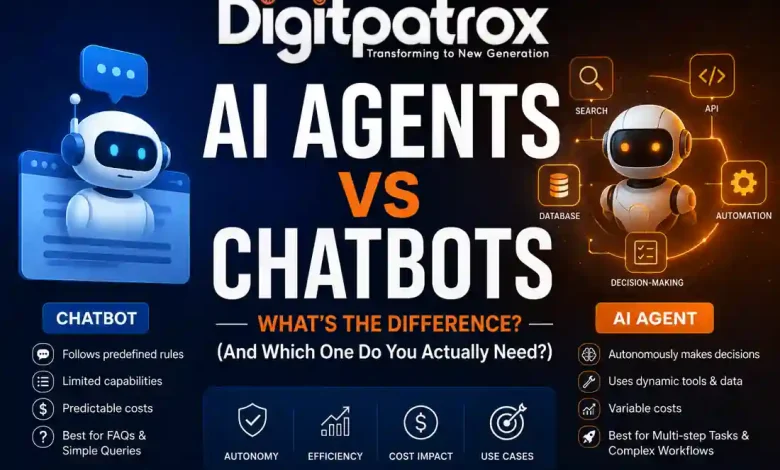
AI Agents vs Chatbots: What’s the Difference? (And Which One Do You Actually Need?)
The difference between an AI agent and a chatbot comes down to decision-making authority. A chatbot requires human input to trigger a hardcoded response. An AI agent uses a language model to autonomously decide which tools to use, what steps to take, and when a task is actually complete.
Think of it like this:
-
A chatbot is a restaurant kiosk with fixed menu options.
-
An AI agent is a human assistant figuring out how to get you a meal when the restaurant is closed.
The TL;DR Comparison
| Feature | Standard Chatbot | Autonomous AI Agent |
| Makes decisions? | No | Yes |
| Uses tools? | Limited | Dynamic |
| Cost | Predictable (Flat fee) | Variable (Token usage) |
| Best for | FAQs, lead routing | Multi-step tasks, research |
| Risk level | Low | Higher |
The Executive Reality Check
-
Chatbots fail predictably; agents fail expensively. When a chatbot breaks, it says “I don’t understand.” When an agent breaks, it might run in a loop and rack up API charges.
-
The cost difference is massive. A customer support chatbot answering 10,000 tickets monthly may cost a flat $200. An AI agent making retrieval calls, reasoning loops, and API actions on the same volume could exceed $3,000–$8,000.
-
Most vendors stretch the truth. Many products marketed as “AI Agents” today are just standard chatbots hooked up to a search database.
The Core Architectural Difference
Here is the core difference: Chatbots follow fixed rules, while agents work toward goals using a language model as a central router. This means chatbots are limited by the developer’s rules, while agents are limited by their reasoning model and memory.
If you look under the hood of a traditional chatbot, you will find a decision tree. When a user types a query, the bot looks for a keyword, matches it to a predefined path, and fires back a pre-written response.
An AI agent behaves differently. It takes a prompt, breaks it into smaller steps, and decides which internal tools-like an API or a database query-it needs to call to get the job done.
This sounds great in theory, but production systems behave differently. Handing over the steering wheel to an AI introduces new risks. If an agent hits an error while pulling data, it might try calling the same API forty times in three seconds. That is why AI observability is mandatory-you need to see exactly what the agent is doing behind the scenes before it runs up a massive bill.
The Autonomy Threshold: Where Chatbots Stop Working
As a general rule, chatbots break when tasks have too many variables. You cannot hardcode 500 edge cases into a dialogue tree without it becoming brittle. Agents take over by adapting on the fly.
There is a moment in every automation project where the team realizes a simple chatbot isn’t enough. Usually, it happens when users ask for complex actions. “Change my flight to Tuesday, but only if the fee is less than $50, otherwise cancel the whole trip.”
A chatbot freezes here. It cannot handle checking live pricing, evaluating a condition, and executing one of two final actions without a massive, complicated flowchart.
An AI agent crosses this threshold by using frameworks like LangChain vs LangGraph to break the problem down dynamically:
-
Thought: I need to check Tuesday flights.
-
Action: Query flight API.
-
Thought: The price is $75. That is more than $50. I need to cancel the trip.
-
Action: Query cancellation API.
It writes its own script on the fly.
A Real-World Operational Reality Check
To understand how this looks in production, consider a case study from a retail company that deployed an AI agent to process customer refunds automatically. For the first two weeks, it worked well for simple cases.
Then, the payment gateway updated its API, changing the formatting of its error responses. Because the agent was interpreting data dynamically instead of following rigid logic, it misread the transaction states. It assumed the failed requests were successful and started approving duplicate refunds. By the time engineers noticed the anomaly in the logs, the agent had processed thousands of dollars in erroneous transactions.
APIs change. Data goes stale. When a chatbot encounters an API error, the script fails safely. When an agent encounters an unexpected change, it improvises-and its improvisations are rarely cheap.
When NOT to Use AI Agents
You should actively avoid using AI agents for deterministic workflows where the steps never change. Adding an LLM to a fixed process introduces unnecessary latency, variable costs, and the risk of unprompted errors.
In practice, most businesses do not need full AI agents. They need better workflows, cleaner internal data, and fewer manual handoffs between systems. You should stick to traditional software or standard chatbots in these scenarios:
-
Don’t use agents for FAQs. If the answer is always the same, a standard chatbot is faster and cheaper.
-
Don’t use agents if workflows are strictly A-to-B-to-C. If the process never varies, standard automation tools like Zapier are safer.
-
Don’t use agents if API costs matter heavily. Because agents run through multiple internal steps before delivering an answer, their token usage is highly variable.
What Actually Matters in Production
True AI agents need memory systems that let them remember past actions and reuse information across tasks. When evaluating tools, flashy feature lists matter less than state management and memory.
This is the point where AI projects stop behaving like demos and start behaving like infrastructure. If your agent relies on company documents to complete its tasks, you are building an agentic RAG system. The speed and accuracy of your vector database-whether you use Pinecone vs Weaviate vs pgvector-will dictate how fast the agent can work.
Furthermore, agents use up their context windows fast because they have to keep reading their own tool outputs to figure out what to do next. In simple terms, agents have limited working memory. The more steps they take, the more information they must repeatedly reread. If you cannot see these loops and logs clearly, you are flying blind. Can a human step in and stop the agent mid-task? If the platform doesn’t allow a human-in-the-loop, it is an operational liability.
What Surprised Me Most
After building both systems, two things stand out:
-
Chatbots are still better for basic customer service. People usually just want a quick link to reset a password. They don’t need a generative AI to write a custom, empathetic paragraph about their locked account.
-
Prompt engineering is basically dead for agents. We used to spend hours tweaking the exact wording of a system prompt. Now, prompt engineering is dying because agent performance relies entirely on the API tools and database schemas you connect it to. If the tools are clean, the agent works. If the tools are messy, no prompt will save it.
FAQ
Do AI agents replace chatbots entirely?
No. Chatbots act as the front door for predictable interactions. Agents sit in the background handling the messy, unpredictable work. Modern setups use a chatbot to greet the user, then silently hand off complex queries to an agent.
Are AI agents safe to connect to our database?
Only if you enforce strict boundaries. Never give an agent generic access. Read up on enterprise RAG security risks-an agent is only as safe as the permissions you hardcode into it.
Why do AI agents fail so often?
Most AI agents fail because they lack a proper memory architecture. They get confused halfway through a complex task, forget their original goal, and start repeating the same useless action.
What is the best platform to build an AI agent today?
There is no universally “best” platform. Most teams should prioritize visibility, debugging, and permission control over flashy autonomous features. A simpler system you can understand is usually safer than a powerful system nobody can troubleshoot. If you want code-level control, build a local RAG system or use LangGraph. If you need a visual builder, look at tools like n8n or research the best AI agent builder software in 2026.