

AI Agents Explained also knows as Agentic AI: How They Work, Real Examples, Tools + Future Trends
AI agents are moving beyond “chatting” to “doing.” While 2024 was the year of the chatbot, the next three years will be defined by autonomous agency—AI that doesn’t just suggest a plan but executes it.
Most companies experimenting with AI agents today are still in early-stage adoption; however, success depends far more on internal data quality than the specific model capability. AI agents are often compared to chatbots and automation tools, but their ability to make decisions and take actions sets them apart. Industry adoption of AI agents is accelerating, but most implementations today remain semi-autonomous, requiring human validation for critical steps.
💡 Quick Definitions for the Featured Snippet
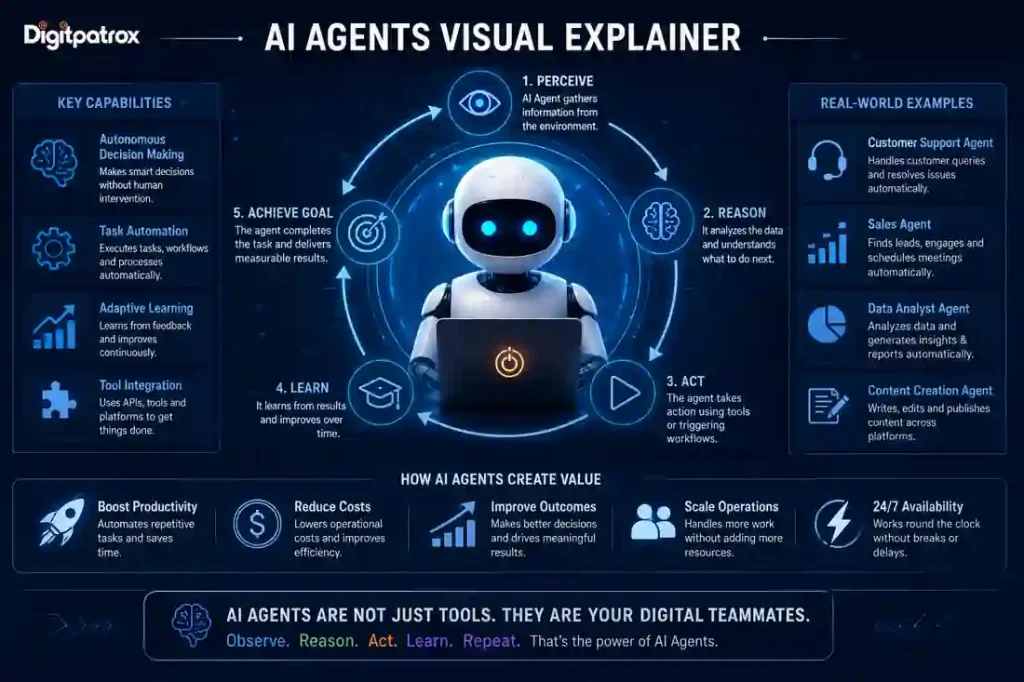
What is an AI agent? An AI agent is an intelligent system that can plan, make decisions, and use external tools (like email, browsers, or databases) to complete a goal with minimal human input.
What is AI automation? Traditional automation follows “If-This-Then-That” rules to complete repetitive tasks. Unlike automation, AI agents can adapt and “self-correct” when conditions change.
1. AI Agent vs. Chatbot: What’s the Difference?
Before diving in, it’s vital to clear up the most common confusion. While they use the same underlying technology (Large Language Models), their “intent” is completely different.
-
Chatbots (Reactive): Designed to respond to queries. They wait for a prompt and provide text, code, or images. Examples include the standard interface of ChatGPT or Claude.
-
AI Agents (Proactive): Designed to take actions. They use reasoning to determine which tools are needed to reach a goal and execute those steps autonomously.
🚀 Key Insight: A chatbot will tell you how to book a flight; an AI agent will actually book it for you.
2. AI Agents vs. Automation vs. Chatbots
| Feature | AI Chatbots | Traditional Automation | AI Agents |
| Primary Goal | Communication | Data Transfer | Goal Completion |
| Logic | Text Prediction | Fixed Rules | Dynamic Reasoning |
| Decision Making | ❌ | ❌ | ✅ |
| Flexibility | High (in conversation) | Low (Breaks easily) | High (Self-correcting) |
| Tools Used | None (usually) | Zapier, APIs | Browsers, ERPs, CLI |
| Example | ChatGPT | Syncing leads to CRM | “Research and book a flight” |
3. When Should You Use Each? (Decision Logic)
Choosing the wrong tool creates hidden costs—unreliable outputs or brittle workflows that break weekly.
Use Traditional Automation when:
-
The task is highly repetitive
-
Rules never change
-
You need 100% predictable outcomes (e.g., “Always move row A to database B”)
Use AI Agents when:
-
The task requires decision-making based on varying inputs
-
The workflow spans multiple tools without perfect APIs
-
You need a system that can self-correct when a minor step fails
4. How to Build an AI Agent: A Step-by-Step Overview
If you want to move from “prompting” to “programming” agency, follow this tactical sequence:
-
Define a Clear Goal: Instead of “Help me with sales,” use “Identify 10 leads on LinkedIn, find their emails, and draft a personalized outreach.”
-
Choose Your Tools: Connect your agent to the “outside world” using APIs or browsing tools (e.g., OpenAI Search, Google Search, or Gmail).
-
Select a Framework: Use LangGraph (for complex logic) or Microsoft AutoGen (for multi-agent collaboration).
-
Add Guardrails: Implement “Human-in-the-loop” approval for final actions and set token/budget limits to prevent “infinite loops.”
-
Test and Refine: Run 10-20 trial cycles to identify where the reasoning “drifts” from your intended goal.
5. Real-World Examples: The “Action Layer” in Practice
To move from “Cognitive Debt” to “Agentic Velocity,” businesses are deploying agents in high-impact areas. Recent data shows that AI-assisted workflows can reduce manual task time by 30–50%, depending on complexity.
-
Customer Support: Instead of a bot saying “Here is a help article,” an agent logs into your Shopify backend, verifies a tracking number, and initiates a refund.
-
Coding: Developers use GitHub Copilot Workspace, Cline, or Microsoft AutoGen—agents that plan entire features and execute file changes autonomously.
-
Small Business: Savvy owners implement AI automation workflows to save 10+ hours a week by letting AI qualify leads and schedule meetings without human intervention.
6. The 3-Year Roadmap: Future Trends (2026-2029)
Year 1: The Rise of LAMs (Large Action Models)
We are moving from LLMs (Large Language Models) to LAMs (Large Action Models).
-
The Change: Agents will interact with legacy apps just like a human by “seeing” the screen.
-
Entity Boost: Watch for OpenAI’s Operator and Anthropic’s computer-use capabilities to dominate the market.
Year 2: Multi-Agent Orchestration
One agent is a tool; a team of agents is a department.
-
The Change: You will deploy Agentic Workforces. A “Manager Agent” assigns tasks to a Researcher, a Writer, and a Fact-Checker using frameworks like LangGraph.
-
The Trade-off: ⚠️ Warning: More agents = higher cost and slower execution. Adding agents reduces hallucinations but increases your “token spend.”
Year 3: Local & Sovereign Agents
To solve the “Trust Gap,” agents will move from the cloud to your hardware.
-
The Change: Using the best local LLMs for AI agents and coding, such as Gemma 4 or Llama 4, your agent will live on your laptop.
7. Why AI Agents Fail: The “Unfiltered” Reality
Organizations often face Contextual Decay. This happens when the agent’s knowledge base (your company docs) is outdated. If an agent tries to follow a 2024 SOP in 2026, the system breaks. To ensure long-term success, you must implement the AI Reliability Engineering AGES Framework to keep your agent’s world model fresh and accurate.
The Bottom Line
AI agents represent a shift from tools you use to systems that work for you. The companies that win won’t be the ones with the best prompts, but the ones with the best workflows and cleanest data.
What to Do Next
If you’re just getting started:
-
Pick one repetitive task that requires simple decision-making.
-
Test it with a “proposal-only” agent (it drafts the work, you click “send”).
-
Measure time saved and accuracy before giving the agent full “write access.”
FAQ: People Also Ask
Q: What is the best AI agent tool for beginners?
A: Zapier Central is the best no-code starting point. For those with technical skills, CrewAI or Auto-GPT offers a great balance of power and simplicity.
Q: Can AI agents work 24/7?
A: Yes, but they require “Agentic Guardrails.” Without monitoring, an agent can get stuck in an “Infinite Loop,” burning through your API budget in minutes.
Q: How do I build an AI agent?
A: Most modern agents are built using LangGraph (for complex logic) or Microsoft AutoGen. You define a goal, provide “Tools” (Search, Gmail, Python), and let the LLM orchestrate the steps.
SEO Post-Flight Checklist
-
Primary Keyword: The future of AI agents
-
Secondary Keywords: AI agents vs chatbots, AI agents vs automation, AI agent examples, LangGraph vs AutoGen, best local LLMs.
-
Internal Links: AI Agents vs Traditional Automation, AI Reliability Engineering.
-
Meta Description: AI agents are the next frontier of productivity. Learn how they work, see real-world examples, and discover the 3-year roadmap for autonomous AI workers (2026 Guide).
