

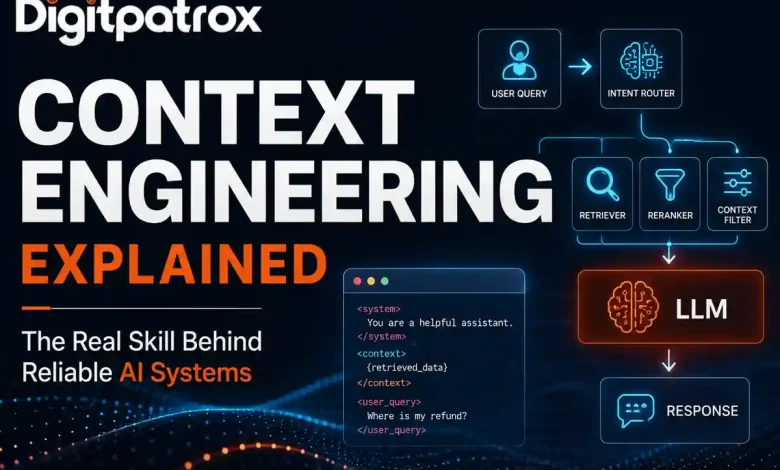
What Is Context Engineering? Why Prompt Engineering Is No Longer Enough
Most production AI failures are not model failures. They are retrieval failures.
For the last two years, the internet was flooded with “Prompt Engineering Cheat Sheets,” as if knowing how to tell an LLM to “take a deep breath” was a technical moat. Typing instructions into a chat box is a baseline skill now. If you want to understand why your production AI system is hallucinating or returning garbage, you have to look deeper.
It’s almost never a problem with the wording of your prompt. It’s a problem with the data pipeline feeding it.
Context engineering is the backend architecture of retrieving, filtering, and injecting real-time data into an AI model’s prompt before it runs. It is the difference between an AI that guesses based on its training data and an AI that knows exactly which customer support ticket was closed five minutes ago.
The Executive Reality Check
-
Prompting is for prototypes; plumbing is for production. You cannot solve a data retrieval problem with better adjectives.
-
Retrieval beats reasoning. A perfect prompt with the wrong data yields a confident hallucination. An average prompt with the correct data yields a useful answer.
-
Massive context windows are a trap. Dumping hundreds of pages into an LLM spikes latency and burns cash without a linear increase in accuracy.
-
Standardize the architecture. If you aren’t using the Model Context Protocol (MCP), your team is likely wasting time on custom, fragile API wrappers.
The “Zero-Click” Answer
Context engineering is the automated backend process of assembling the factual payload that accompanies an AI prompt. While prompt engineering focuses on how the model should act, context engineering focuses on what data the model sees, using dynamic data pipelines to ensure the AI has the exact factual information needed to reason accurately.
Why Better Models Sometimes Make Systems Worse
It sounds counterintuitive, but upgrading to a smarter model with a massive context window often degrades system reliability.
When large context windows (like 1 million+ tokens) became available, a myth took hold that we no longer needed RAG systems. The assumption was that you could just dump an entire codebase or database export into the prompt and let the model sort it out.
Stronger models can encourage lazy retrieval. Teams stop filtering context, which makes debugging nearly impossible. More importantly, it triggers a documented vulnerability. In the benchmark paper Lost in the Middle: How Language Models Use Long Contexts (Liu et al., Stanford), researchers demonstrated that when you overload a model with too much information, its accuracy at retrieving facts buried in the center of the prompt drops significantly.
We call this Context Saturation. You feed the model 180,000 tokens of noise to find one sentence of signal, and the attention mechanism simply loses track of it.
The Token Economics of Lazy Retrieval
Let’s look at the actual math of relying on large context windows instead of context engineering.
Imagine a customer service bot handling 20,000 queries a day.
-
Naive Approach (Dumping a 150k-token user history file): 150,000 tokens × 20,000 queries = 3 Billion input tokens per day. At standard enterprise API rates, that costs roughly $9,000 per day.
-
Engineered Approach (Filtering to the relevant 4,000 tokens): 4,000 tokens × 20,000 queries = 80 Million input tokens per day. This brings the cost down to $240 per day.
Context engineering isn’t just about accuracy. It is a fundamental unit-economics requirement.
[Insert Visual Asset: Bar chart comparing Daily API Costs of Naive vs. Engineered approaches]
Representative Internal Benchmarks (Claude 3.5 Sonnet + pgvector RAG)
| Architecture Strategy | Input Tokens | Latency | Cost / 1k Queries | Recall |
| Raw Data Dump | 150,000 | 19.2 sec | ~$450.00 | 71% |
| Optimized RAG | 4,500 | 2.1 sec | ~$13.50 | 95% |
| Optimized + Caching | 4,500 (Cached) | 0.9 sec | ~$2.80 | 95% |
Notice the caching row. As outlined in Anthropic’s Prompt Caching documentation, separating static background data from dynamic queries allows the model to cache the heavy context. This is the only way to make high-context workflows economically viable for high-frequency applications.
How It Actually Works: Beyond the Chat Box
If you peek under the hood of a professional AI operating system, you won’t find a massive paragraph of English text. You’ll find Python scripts, schema validation, and API orchestration tools like LangGraph.
[Insert Visual Asset: Architecture Diagram showing User Query → Intent Router → Retriever → Reranker → LLM]
In a real codebase, the final assembly of the prompt happens milliseconds before hitting the API. It looks something like this:
Python
# 1. Retrieve and score the data
raw_results = vector_db.search(query_embedding)
context = reranker.top_k(raw_results, k=3)

# 2. Assemble the dynamic payload using XML delimiters
prompt = f"""
<system>
You are a senior billing assistant. Rely ONLY on the context provided below.
</system>

<context>
{context}
</context>

<user_query>
{query}
</user_query>
"""

# 3. Execute the call
response = llm.generate(prompt)
The system instructions are static. The <context> block is aggressively filtered and injected dynamically.
But rerankers like Cohere Rerank introduce their own latency tax. You are making an extra API call to score those chunks before you even talk to the main LLM. At scale, you sometimes end up building a second optimization layer just to keep retrieval fast enough.
What Most Teams Misdiagnose
When an AI system fails in production, teams almost always misdiagnose the root cause.
They tend to blame the model’s reasoning capabilities. They spend weeks rewriting the prompt or switching from OpenAI to Anthropic. In reality, the issue is usually upstream. For instance, a backend microservice might rename a database field from customer_id to customerId. This breaks the JSON parser, injecting an empty context block into the prompt. The LLM happily hallucinates a response anyway, because it doesn’t know the data is missing.
If you don’t audit your retrieval pipeline, you will spend all your time trying to fix a data problem with prompt engineering.
The “Monday Morning” Plan
If your AI’s performance is degrading, stop rewriting the instructions and audit the data flow.
-
Run a Token Audit. Count your input tokens. If your dynamic payload regularly exceeds 10,000 tokens, you likely have a filtering problem.
-
Separate State from Instructions. Adopt the XML delimiter structure shown in the code block above. Models are explicitly trained to parse
<context>tags, which prevents them from confusing background data with the user’s actual question. -
Standardize with MCP. Stop hardcoding custom API wrappers for every internal tool. Adopt the Model Context Protocol to create a universal handshake between your data and your AI.
-
Audit Retrieval Recall. Measure your retrieval accuracy separately from the LLM’s generation quality. If your pipeline isn’t returning the correct source document in the top 3 results, your prompt wording doesn’t matter.
FAQ
Does a 1 Million token context window replace RAG?
No. Massive windows are too slow and expensive for high-frequency queries. RAG is for speed and cost-efficiency; massive windows are for deep, rare analysis.
What is “Lost in the Middle”?
It’s a phenomenon identified by Stanford researchers where LLMs become significantly less accurate at retrieving specific facts buried in the middle of a long context payload.
How do I prevent Context Saturation?
After your initial search, use a cross-encoder model to score the results and keep only the top few most relevant facts before injecting them into the prompt.
Why is my AI hallucinating even with the right data?
It is often a formatting issue. If your context is a messy wall of text, the model can’t distinguish between the user’s question and the factual data. Use XML tags to isolate the context payload.
