

Vector Databases vs SQL Expained: What Actually Breaks in AI Search
Why most RAG systems fail at scale, how hybrid search fixes retrieval quality, and when PostgreSQL with pgvector is enough before moving to Pinecone, Qdrant, or Weaviate.
Vector Databases Explained: What Actually Breaks in Production
A lot of teams assume semantic search “just works” once the embeddings are in place. It usually doesn’t.
A year ago, every AI architecture diagram suddenly started including a vector database-Pinecone, Weaviate, Qdrant, Milvus. For a while, it felt like you needed one just to be taken seriously. In reality, most companies adopting vector search hit the same sequence of problems: semantic search misses exact keywords, RAM usage explodes, and retrieval quality degrades over time.
The hard part of vector search isn’t the “points in space” math. It’s the infrastructure meeting you have 12 months later when your retrieval latency has doubled and your cloud bill suddenly becomes a part of infrastructure planning discussions.
The Executive Reality Check
-
Don’t over-engineer early. If you have under 1 million documents, PostgreSQL with pgvector is usually enough.
-
Pure vector search is a trap. It understands concepts but fails at exact part numbers. Hybrid search (Vector + BM25) is mandatory.
-
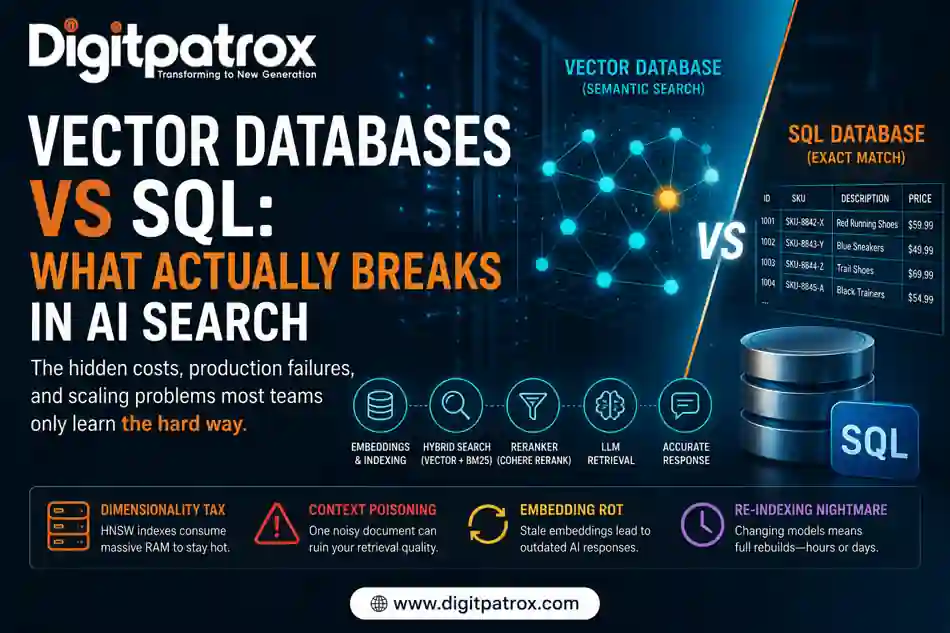
Vector DBs are RAM hogs. Keeping an HNSW index hot in memory is expensive.
-
Re-indexing is the “Ugly” Detail. Changing your embedding model means rebuilding your entire database from scratch.
The “Zero-Click” Answer
Vector databases store data as embeddings-long lists of numbers representing “meaning.” They allow AI to find information based on context rather than exact words. They act as the long-term memory for RAG systems, scanning millions of documents in milliseconds to find conceptually similar information for an LLM to process.
Vector Databases vs. Traditional SQL (Postgres/MySQL)
Traditional relational databases were built for exact matches. They are the “System of Record,” excellent at questions like: “Show all invoices above $10,000.”
Vector databases are the “System of Context.” They understand that “How do I reset my password?” and “recover account access” are conceptually related. This flexibility is why they are the foundation of modern AI operating systems.
The Practical Difference
| Capability | SQL / Postgres | Vector Database |
| Exact keyword matching | Excellent | Weak (requires Hybrid) |
| Semantic understanding | Poor | Excellent |
| Structured transactions | Excellent | Poor |
| Similarity search | Slow / limited | Native capability |
| Cost efficiency (<1M docs) | Better | Worse |
In practice, most teams end up keeping both. The SQL database stores the source of truth, and the vector database acts as a high-speed semantic index. I’ve seen people spend three weeks debating Pinecone vs. Weaviate when their real problem was just a broken Python scraper script feeding the database garbage.
The “Dimensionality Tax”: Why Your RAM Bill is Exploding
Vector indexes are incredibly memory-intensive because search speeds (sub-50ms) require the index-usually a Hierarchical Navigable Small World (HNSW) graph-to live in RAM.
If you’re using OpenAI’s text-embedding-3-small model, each document creates a vector with 1,536 dimensions.
The Benchmark: For reference, a 1536-dim vector for 1 million documents usually takes about 6GB to 8GB of RAM just for the index. If you’re running on a shared cluster, that’s where resource contention starts.
The weird part we noticed during a recent migration was how much the ingestion pipeline became the bottleneck. The database was fine, but the worker nodes couldn’t keep up with the embedding model’s throughput. Once you hit 10 million documents, you aren’t just paying for storage; you’re paying for the massive RAM footprint required to keep that index “hot.”
“Context Poisoning”: The Hidden Quality Risk
Beyond the infrastructure costs, there is a hidden quality issue called Context Poisoning.
In a traditional database, one bad row doesn’t ruin your search results. In a vector database, a single high-density, “noisy” document (like a 50-page legal disclaimer or a poorly scraped PDF) can “pull” unrelated queries toward it in the vector space.
We audited a legal tech startup where their search started surfacing marketing copy instead of contract clauses. The culprit? They had embedded their entire website’s SEO-optimized blog into the same index as their legal documents. The “meaning” of those blog posts was so broad that the vector search kept thinking they were the most relevant match for almost every query, effectively poisoning the retrieval for the entire system.
The “Ugly” Reality of the Re-Indexing Nightmare
The part nobody tells you about vector databases is how hard it is to change your mind. If you decide to switch from OpenAI’s embeddings to a local model or a specialized coding AI model, you can’t just “convert” the data.
You have to re-process and re-index the entire dataset from scratch.
For a database with 40 million chunks, this can take 15–20 hours of compute time. During that window, you effectively need double the storage and RAM to keep the old index alive while the new one builds. It’s an operational nightmare that teams rarely budget for until the bill arrives.
Visualizing the RAG Workflow
Most people think it’s just Query → Database → Response. It’s actually more like a filter pipeline:
User Query → Embedding Model → Vector Search + Keyword Search (BM25) → Hybrid Search Result → Reranker → LLM Prompt → Response
Without that Reranker step, you are essentially trusting the database’s first guess, which is often wrong.
What to Fix First
If you’re building an AI feature this week, don’t get lost in the hype.
-
Start with pgvector. The operational tradeoff is manageable, and you don’t need a new vendor.
-
Use Hybrid Search immediately. Combine vector search with BM25 keyword matching. Don’t wait for users to complain they can’t find exact ID numbers.
-
Address Embedding Rot. If your data changes (like a price update), re-embed that chunk immediately. Your AI will keep quoting old data until the vector is updated.
-
Watch your chunking. If you embed whole pages, the vectors get “blurry.” Break data into 512-token chunks with 10% overlap to keep the semantic signal sharp.
The Strategic Perspective
The biggest mistake companies make is assuming retrieval quality is primarily a database problem. Usually, it isn’t.
Most RAG failures come from bad chunking, stale embeddings, or noisy source documents long before the vector engine itself becomes the bottleneck. The infrastructure matters, but the retrieval architecture-how you filter, rerank, and clean your data-matters more. In practice, the simplest stack that reliably returns the right context is still the best one.
Queries
Do vector databases replace SQL?
No. SQL is for truth; vectors are for context. Most modern AI browsers and agents use both in tandem.
Why not just use Elasticsearch?
You can. Elasticsearch has added vector capabilities and is excellent for hybrid search. However, specialized databases often handle high-dimensional ANN index updates more efficiently at massive scales.
Why is my AI still hallucinating?
Usually, it’s because your retrieval window is too small. If the database only sends the top 2 chunks to the LLM, but the answer was in the 4th chunk, the AI will make something up.
How do I stop Context Poisoning?
Metadata filtering. Tag your “trusted” documents vs. “noisy” documents and filter your search results based on the user’s intent.
Is it hard to host my own vector DB?
Tools like Qdrant and Milvus are great, but self-hosting means managing HNSW rebuilds and CPU spikes. If you aren’t comfortable managing Kubernetes resources, stick to managed services.
