

TikTok Architecture Explained: How the App Figures Out What You Want to Watch
Inside the high-concurrency real-time data pipelines and stream processing engines that power viral video recommendation loops.
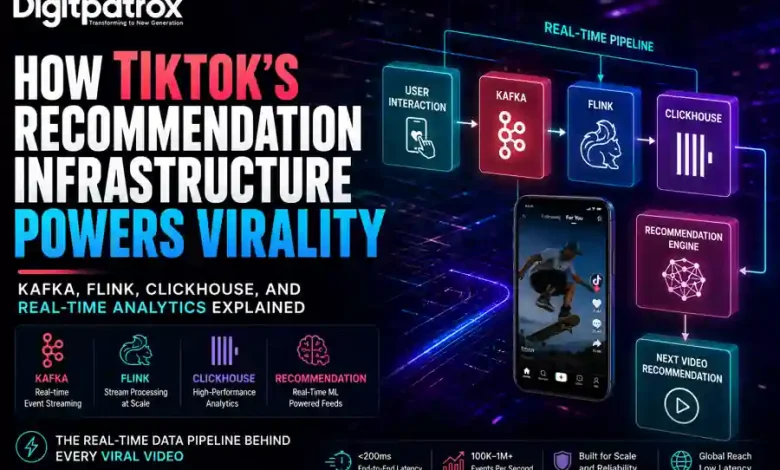
When a video goes viral on TikTok, millions of people look at it at the exact same moment. Most people think the hard part for TikTok is sending the video file to everyone’s phones.
But it isn’t. The video files are stored on servers all over the world, ready to play instantly.
The real magic-and the hardest part-is the hidden data engine running in the background. Every time you watch a clip, skip a video, or leave a like, your phone sends a tiny data signal back to TikTok. If millions of people do this at the exact same time, it creates a massive traffic jam. If TikTok’s servers slow down for even a second, the app can’t track what you like, the system gets confused, and the video stops being recommended to other users.
Executive Reality Check
-
Data Over Video: The hardest part of a viral video is managing the flood of user data (likes, skips, watch time), not streaming the video itself.
-
The Traffic Jam: Traditional databases crash when millions of people try to save their likes and comments at the exact same second.
-
Smart Buffering: To fix this, apps use a “waiting room” system to collect data safely before saving it permanently.
-
Instant Updates: The app updates your personalized feed on the fly based on what you looked at just a few seconds ago.
-
Hidden Computing Costs: Tracking exactly how many seconds you spend on a video uses way more computer power than just playing the clip.
The Short Answer
TikTok stays fast because it splits your data into two pathways. Your video files are stored near you on global servers so they load instantly. Meanwhile, your interactions (likes, scrolls, watch time) are sent into a specialized high-speed conveyor belt called a Stream Pipeline. This system gathers everyone’s data, cleans it up in mid-air, and feeds it straight to the AI engine in under a second so the app immediately knows what video to show you next.
How Your Swipes Control the App
Every time you use the app, a continuous loop runs between your phone and the main servers.
[Your Phone] ───(Sends your actions)───> [High-Speed Pipeline]
     ▲                                            │
     │                                     (Takes less than 1 second)
     │                                            ▼
[New Video Feed] <──(AI Picks Next Video)── [TikTok Brain]
When you scroll through your feed, the app is paying close attention:
-
Did you watch the whole video?
-
Did you loop it twice?
-
Did you swipe away after only two seconds?
If the system processes your actions quickly, the AI understands your current mood and gives you a great next video. But if the servers get overwhelmed by too much traffic, your data packets get delayed or dropped. To the algorithm, a lost data packet looks like you swiped away out of boredom. It assumes you hated the video, and it stops showing that clip to other people, killing its viral growth.
The App’s Internal Factory: Sorting Data on the Fly
Based on public research papers and engineering details shared by major platforms, a viral media app handles data using a factory style called a Lambda Architecture. It divides your information into two specialized pipelines:
                            ┌───────────────────────────┐
                            │    Your Clicks and Swipes │
                            └─────────────┬─────────────┘
                                          │
                  ┌───────────────────────┴───────────────────────┐
                  ▼                                               ▼
     [ The High-Speed Conveyor Belt ]              [ The Deep Storage Vault ]
     ├── Processes data right now                  ├── Saves data for later
     ├── Remembers what you did 5 seconds ago      ├── Studies major trends overnight
     └── Instantly updates your feed               └── Teaches the AI new habits
1. The High-Speed Conveyor Belt (Speed Layer)
This pathway handles what you are doing right this second. It ignores your long-term history and focuses purely on your immediate actions over the last few minutes. It uses high-speed sorting systems like Apache Flink to update your preferences in milliseconds.
2. The Deep Storage Vault (Batch Layer)
This pathway is slow but massive. It collects all the raw data from the day and saves it to huge cloud storage systems. Overnight, powerful computers analyze these giant piles of data to teach the AI brand-new patterns and find global trends.
The 5 Steps from One Swipe to Your Next Video
Here is the exact journey your data takes behind the scenes every time you interact with a post.
1. The Instant Hand-Off
When you hit a like button, your phone fires a quick digital note to the server. The server doesn’t stop to read it right away-that would take too long. Instead, it drops the note into an intake bin and tells your phone “Got it!” in under 5 milliseconds. This keeps the app feeling snappy and responsive on your screen.
2. The Sorting Queue
Next, the note enters a massive digital sorting system. At TikTok’s scale, engineers use advanced message streams like Apache Kafka or custom tools to organize billions of incoming notes. It separates user actions into different lines: one for explicit actions like clicks and comments, and another for background context like your network speed and location.
3. The Mid-Air Blender
A data processing tool named Apache Flink grabs the notes from the queues. It acts like a blender, taking your live actions and mixing them with your basic user profile on the fly. To stay fast, it performs all these calculations inside the server’s super-fast temporary memory (using a tool called RocksDB) instead of writing to a slow hard drive.
4. The Live AI Brain
The blended data is sent directly into the platform’s core AI system (ByteDance calls theirs Monolith). Unlike older AI models that only learn once a week, this brain learns continuously.
-
Popular Trends: If a video goes viral, the system updates its features across all active servers simultaneously.
-
Trimming the Noise: To save memory, it ignores accounts that haven’t been active in months, focusing all its processing power on users who are online right now.
5. Assembling the Menu
Finally, the system prepares your next collection of videos. It picks 10,000 potential clips, filters out videos you’ve already seen or blocked, ranks them using the live AI weights, and shuffles the genres so you don’t get bored. The winning video payload is then delivered back to your device.
Operational Scars: What Breaks During a Viral Spike?
When an application scales up to face millions of users, things break in highly predictable ways.
The Doorway Jam (10,000 actions per second)
If an application is built poorly, it tries to talk directly to its main database for every single click. At this tier, the system runs out of digital doorways (network sockets). The servers don’t crash from lack of power; they fail simply because they can’t open new connections fast enough to listen to incoming user data.
The “Superstar” Bottleneck (100,000 actions per second)
Data streams usually group information by video ID. But if a single clip goes massively viral, hundreds of thousands of people send data to the exact same video ID at once. This creates a hotspot where a single server node gets crushed by the weight of a single video, slowing down the entire application network. To fix this, engineers must break up the data keys randomly to distribute the load across multiple machines.
Memory Overloads (1,000,000 actions per second)
When millions of data strings flood the system, computer languages like Java or Go use massive amounts of temporary memory. The server’s built-in cleanup crews (called Garbage Collectors) have to pause all active operations to tidy up memory. These tiny pauses freeze the stream pipeline, creating backlogs that knock the recommendation engine offline for hours.
Choosing the Right Setup: Startups vs. Giants
Building a data system requires balancing performance against real budget limits.
| Plan | Best For | Technical Approach | Pros & Cons | Est. Cost |
| The Ready-Made Cloud | Small teams and new apps. | Pay-as-you-go cloud services (AWS Lambda, DynamoDB). |
Pros: Zero maintenance.
Cons: Gets very expensive as traffic grows. |
$ (Low starting cost) |
| The Hybrid Mix | Fast-growing platforms. | Managed data queues (Kinesis, Cloud containers). |
Pros: Handles spikes cleanly.
Cons: Requires a couple of full-time engineers to run. |
$$ (Moderate cost) |
| The Custom Factory | Global giants (TikTok/Meta scale). | Custom bare-metal server networks (Kafka, ClickHouse). |
Pros: Lowest cost per video; extreme speed.
Cons: Needs a massive team of infrastructure experts. |
$$$ (High fixed overhead) |
Why the Giants Are Faster Than Everyone Else
A major tech company like ByteDance achieves incredible speeds because they own their infrastructure end-to-end. Instead of renting computer space from public clouds like Amazon or Google, they build their own physical data centers right next to major internet pipelines. By holding their AI model parameters inside ultra-fast, custom memory networks, their systems calculate personal feeds in single-digit milliseconds without relying on public cloud loops.
The Smart Plan for Startups
If you are launching a new media app, trying to copy a giant’s infrastructure on day one will break your bank. The smart approach is a hybrid model:
-
Protect the Gate: Use edge services like Cloudflare to block spam and fake traffic before it reaches your backend servers.
-
Rent the Waiting Room: Use managed streaming tools (like Redpanda Cloud or AWS Kinesis) to handle incoming data traffic without managing complex server clusters yourself.
-
Separate Your Storage: Save your analytic traffic to a column-oriented database like ClickHouse, and keep your core user login database completely separate so it never gets bogged down by user activity spikes.
Summary of Core Engineering Concepts
For those who want to study the real academic foundations behind these systems, these published papers outline the exact math and architecture rules used by major engineering teams:
-
ByteDance’s Recommendation Engine: Monolith: Real-Time Recommendation System With Collisionless Embedding Table (Presented at ACM RecSys 2022). Explains how the app updates user profiles continuously without running out of memory.
-
Netflix’s Pipeline Blueprint: Detailed technical briefs from the Netflix Technology Blog regarding their Keystone Framework, which handles trillions of real-time events daily.
-
Stateful Processing Fundamentals: Official documentation from the Apache Software Foundation regarding Apache Flink time windows and database state engine optimization.