

What Are AI Agents and Why Is Every Company Building Them?
A beginner-friendly guide to how AI agents plan, reason, use tools, and automate real business workflows with human oversight.
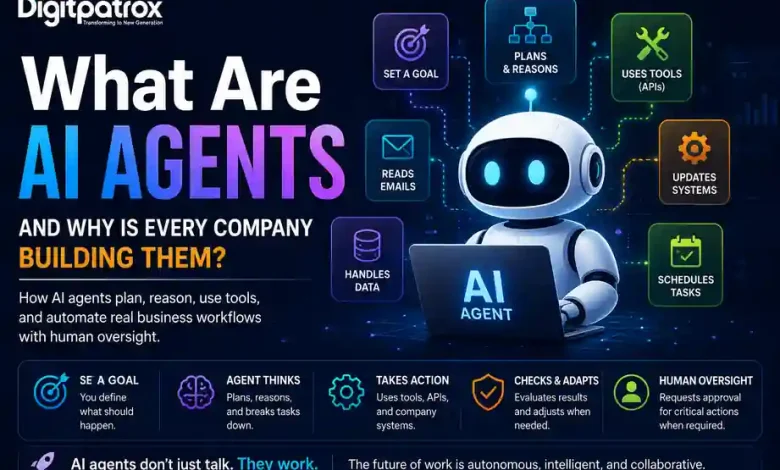
AI doesn’t become useful when it talks. AI becomes useful when it acts.
That is why every major technology company is racing to build AI agents. Unlike traditional chatbots that only generate text answers, AI agents can use software tools, access company systems, make decisions, and complete tasks on behalf of humans. An AI agent doesn’t just talk; it works.
Executive Reality Check
-
From talking to doing: Traditional chatbots give you instructions on how to complete a task. AI agents are given a goal, a set of software tools, and the authority to take actions to finish the job autonomously.
-
The automation upgrade: Traditional software automation is rigid—if an unexpected formatting error occurs, the script crashes. AI agents can often adapt to unexpected inputs and attempt alternative strategies when predefined workflows fail.
-
The workflow exploration: Companies are exploring whether AI agents can learn and execute parts of complex workflows that traditionally required extensive human training and manual data entry.
-
Efficiency over headcount: The immediate goal isn’t to replace human workers, but to stop humans from doing low-value, repetitive computer tasks so they can focus on actual problem-solving.
-
The integration challenge: Agents are only as good as the internal corporate tools they can access. If a company’s internal software systems are disorganized, their AI agents will struggle to function.
The Short Answer
An AI agent is a software system powered by an artificial intelligence model that can independently plan, make decisions, and use digital tools to achieve a specific goal. Humans specify what should happen, and the agent decides how to achieve it. Instead of a human manually clicking through multiple software platforms to complete a task, an AI agent can log into those systems, handle the data entry, and complete significant portions of the workflow autonomously, often with human approval checkpoints.
What Happens When You Give an Agent a Goal?
Unlike a chatbot, which generates a single text answer to a prompt, an AI agent operates in an active, repeating execution loop. It continuously plans, acts, evaluates, and adapts until it either reaches the goal or asks for human assistance.
User Goal
   ↓
AI Agent Core
   ↓
Plans Tasks
   ↓
Uses Tools (APIs)
   ↓
Checks Results
   ↓
Retries / Adapts if Needed
   ↓
Requests Human Approval
   ↓
Completes Task
The Evolutionary Leap: Chatbots vs. AI Agents
To understand why businesses are racing toward agents, consider how these systems diverge from traditional conversational tools.
The Chatbot Setup (Passive Input/Output)
User Prompt ──> [ Chatbot Engine ] ──> Text Answer on Screen
Traditional chatbots are primarily designed to generate responses rather than independently pursue long-running goals. They sit silently until a human types a prompt, output text based on that prompt, and wait for the next manual input. The human still has to execute the actual work. For a clear understanding of the underlying programmatic constraints that impact these text-only boundaries, read our index tracking ai context windows explained.
The AI Agent System (Active Execution Loop)
User Goal ──> [ AI Agent Core Reasoning ]
                    │          ▲
                    ▼          │ (Evaluates Result)
            [ Accesses Tools & APIs ]
              ├── Reads Email Logs
              ├── Updates CRM Software
              └── Schedules Calendar Events
An AI agent behaves more like an autonomous software operator. You give it an objective, and it creates its own internal checklist to complete it. It can check its own work, realize it made an error, correct course, and use external software systems through code connections without a human holding its hand. For an inside look at how these internal execution models are mapped out by developers, explore our structural guide on ai agent architecture explained.
How an AI Agent Actually Thinks: The Four Pillars
To understand how an AI agent can handle complex workloads without constant human supervision, look at the four core pillars of its internal logic:
1. The Goal
Instead of giving the AI a rigid, step-by-step instruction script, you give it a final destination. For example: “Find the three cheapest shipping vendors for this product itinerary and notify the logistics team.” Humans specify the final outcome; the agent determines the method.
2. Planning and Reasoning
The agent takes the goal and breaks it down into individual micro-tasks. It looks at its options, decides what to do first, and iterates through a cycle of planning, tool use, and evaluation:
-
“First, I need to open the logistics vendor database.”
-
“Second, I will pull the current price tables.”
-
“Third, I will compare the rates against our budget parameters.”
3. Tool Utilization
This is the agent’s secret weapon. Agents are given digital “hands” through backend connections called APIs. An agent can read records, send text messages, or write data into spreadsheets. To understand how software systems allow completely different applications to securely pass these actions back and forth behind the scenes, see our guide on what is oauth and why ai agents depend on it.
4. Memory Systems
An agent maintains a memory log of what it has tried so it doesn’t get stuck in repetitive loops. If it tries to log into a system and encounters a temporary network timeout, its memory tracks that failure, and it automatically retries the request or attempts an alternative strategy. To see how these background memory clusters store past interactions over long execution schedules, read our technical breakdown on ai agent memory systems explained.
The Guardrail: Human-in-the-Loop
A common misconception is that deploying an AI agent means turning over complete, unmonitored control of your business to software. In production environments, that is rarely the case. Most enterprise agents operate with strict Human-in-the-Loop approval checkpoints.
[ Agent Reads Invoices ] ──> [ Agent Drafts Payment ] ──> [ WAIT FOR HUMAN APPROVAL ] ──> [ Submit Payment ]
The agent handles 95% of the slow, manual labor: gathering data, cross-referencing files, and drafting the final asset. However, before a critical action is executed—like sending money to a vendor or emailing a high-value client—the agent pauses and waits for a human manager to review and approve the step. This balance combines the speed of AI automation with the safety of human oversight.
Real-World Examples: What Agents Handle in Daily Work
Companies don’t want AI agents because they love tech hype; they want them because they solve painful, slow human operational bottlenecks.
-
Customer Support Resolution: Instead of a customer talking to a basic script bot that routes them to an endless FAQ link, an AI agent can listen to a complaint about a broken product, verify the purchase history in the internal sales logs, process a refund transaction, and order a replacement shipment natively.
-
Financial Auditing: Instead of an accountant spending days opening individual invoice PDFs and manually typing totals into an Excel sheet, an AI agent can scan a corporate folder of thousands of receipt images, cross-reference them with banking transactions, flag anomalies, and file the summary report.
-
IT Support Automation: An agent can monitor an internal support ticket queue, read a user request for software access, check system logs to verify the employee’s security clearances, reset the password or issue an access token, and automatically close the ticket while notifying the user.
-
Sales Pipeline Management: An agent can monitor incoming website inquiries, identify high-intent leads based on corporate profiles, draft personalized introductory emails, and schedule meetings directly onto a sales representative’s calendar.
The 6-Month Reality Check: What Breaks Post-Deployment
While the pitch for AI agents sounds flawless on a slide deck, operating these systems in continuous production reveals specific structural roadblocks that engineering teams must manage:
-
The Hallucination Loop: If an AI model experiences an internal error or misinterprets a messy piece of corporate data, it can start making decisions based on false assumptions. If left unmonitored without strict guardrails, an agent could execute repetitive background actions based on flawed logic. To learn how engineering teams monitor and diagnose these silent algorithmic failures, see our guide on ai observability explained.
-
Brittle System Integrations: Agents rely entirely on corporate data access pipelines. If an IT team updates an internal database schema or changes password access criteria without updating the agent’s routing parameters, the agent will instantly lose its ability to function, causing background automations to stall silently.
-
Permission Sprawl & Security: As agents gain access to emails, CRMs, databases, and internal APIs to complete their tasks, managing their access rights becomes a major security challenge. Managing permissions, auditing agent actions, and enforcing strict revocation boundaries is critical to preventing security breaches. To assess how to safely structure enterprise endpoints against external system risks, see our review on enterprise rag security risks.
-
Skyrocketing Compute Costs: Unlike standard software scripts that run for fractions of a penny, AI agents are constantly running heavy language models in the background to calculate their next moves. If an agent gets stuck in a logic loop, it can rack up significant API platform usage bills over a single weekend. To evaluate the underlying hidden operational infrastructure expenses that stack up during large deployment spikes, read our breakdown on the hidden cost of ai agents.
Final Strategy Evaluation
Before an organization jumps headfirst into building a complex network of autonomous software operators, management must carefully weigh the long-term trade-offs.
                    [ AI Deployment Evaluation ]
                                  │
         ┌────────────────────────┴────────────────────────┐
         ▼                                                 ▼
[ Simple Structured Workflows ]                  [ Complex Dynamic Workflows ]
  - High Reliability                                - Adapts to Ambiguous Inputs
  - Fixed, Predictable Cost                         - Variable AI Processing Fees
  - Breaks if Formatting Shifts                     - Risk of Logic Hallucinations
Automation Deployment Choices
| Evaluation Metric | Basic Standard Automation (Zapier / Strict Scripts) | Advanced Autonomous AI Agents (n8n / Custom LLM Layouts) |
| Best Execution Domain | Highly repetitive, predictable data transfers with zero variation in format. | Messy, unpredictable business processes requiring reading emails, text interpretation, or adaptive decision-making. |
| Worst Execution Domain | Reading open-ended customer emails or handling unexpected input changes. | Strict, critical financial auditing where a single formatting variation requires a zero-tolerance error rate. |
| Setup & Maintenance | Straightforward; low-code setup that remains stable until an app changes its layout. | Highly complex; requires consistent monitoring, fine-tuning of system prompts, and strict safety boundaries. |
| Operational Scalability | Linear; cost scales explicitly based on transaction volumes. | Volatile; cost depends on the complexity of the thinking steps required per task. |
For organizations ready to build these advanced operational setups without relying entirely on restrictive third-party SaaS structures, see our technical walkthrough on how to build an ai agent with n8n and mcp.
Summary: The Shift Toward Autonomous Operations
For decades, computers were tools that humans had to operate actively. If you didn’t click the button, type the text, or run the script, the computer sat completely inert.
AI agents are rewriting that fundamental relationship. We are moving away from an era of software applications that we use, and into an era of digital systems that we manage.
The core focus is shifting:
-
Process Orchestration is replacing basic data entry training.
-
System Access Design is replacing traditional user interface limitations.
-
Operational Monitoring is replacing constant manual clicking as the metric for day-to-day productivity. To ensure you stay optimized during development loops, choosing the correct tools matters; see our guide exploring cursor vs windsurf vs claude code to see which setup ships your infrastructure integrations faster.
The ultimate winners in the modern business ecosystem won’t be the companies that write the largest volume of custom internal code. Organizations that build reliable, secure, and observable AI systems will have a significant advantage as autonomous agents become more capable and widely adopted.