

How to Build an AI Agent for Your Business Without Coding (That Actually Works)
We are currently watching every software vendor on the market slap an “Agent” label on their product. You have likely seen the video pitches on Twitter or LinkedIn: a clean interface, a simple text prompt, and suddenly a customer support bot is flawlessly processing refunds, checking inventory, and updating Zendesk without human intervention.
In a highly controlled environment with perfectly formatted dummy data, these demos look like magic. But when you actually deploy these systems into the wild, AI automation gets messy incredibly fast. Building an AI agent without writing code is entirely possible right now, but if you try to automate real business processes without hard architectural guardrails, you are going to break things.
Here is how you actually build, deploy, and maintain an AI system that survives contact with your daily operations.
What Is an AI Agent, Really?
Before looking at the infrastructure, we need to clarify what this term actually means because the industry has completely muddied the waters.
The distinction people keep missing is that chatbots mostly generate language, while agents generate outcomes inside systems. That sounds semantic, but operationally it changes everything.
Instead of only answering questions based on static knowledge, an agent can query databases, trigger workflows, route tickets, and interact with software tools automatically. A traditional chatbot answers a customer’s question about your return policy. An AI agent reads the customer’s email, logs into your Shopify backend, verifies the tracking number, validates the return window, and executes the refund via Stripe.
A Simple Breakdown of the AI Agent Stack
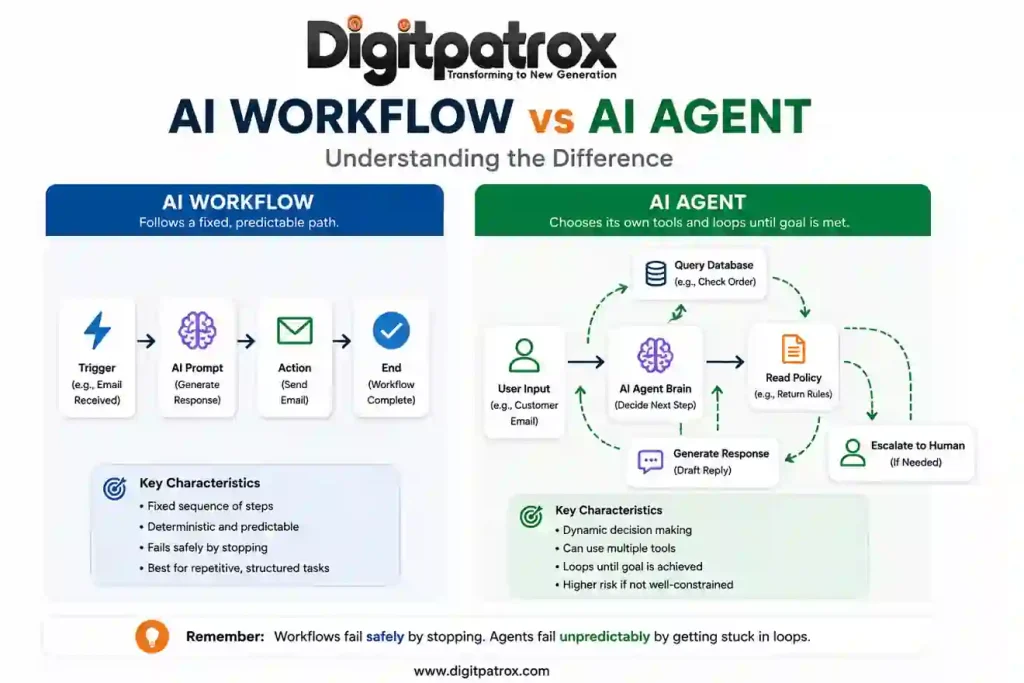
If you ignore the marketing buzzwords, building an AI agent comes down to organizing three basic layers. Here is how they actually connect in plain English:
| Layer | What It Represents | No-Code Example Tools | What It Actually Does | What Happens if It Breaks |
| 1. The Orchestrator | The Hands | n8n, Make.com, Zapier | Shuffles data between your apps (e.g., grabs an email from Zendesk, passes it to the AI, then takes the AI’s response and updates Shopify). | The automation freezes. Data stops moving between your tools, but at least your database isn’t corrupted. |
| 2. The Brain | The Reasoning | OpenAI API, Anthropic Claude | Reads the unstructured text from the user, decides what the user actually wants, and formats the response. | The agent hallucinates, speaks in loops, or wraps its answers in weird code formatting that breaks the next step. |
| 3. The Memory Layer | The Filing Cabinet | Pinecone, Postgres + pgvector |
Stores your company knowledge bases, internal policies, and long-term customer chat histories. | The agent gets amnesia. It completely forgets what the customer said two minutes ago or quotes an outdated policy. |
What Most Businesses Get Wrong
Most companies assume AI projects fail because the underlying LLM simply isn’t smart enough yet. In reality, the intelligence of the model is rarely the bottleneck anymore.
Failures almost always stem from broken data routing or weird edge cases you didn’t anticipate. For example, we lost an entire afternoon once because an LLM suddenly started wrapping valid JSON in markdown code fences after a silent backend model update from OpenAI. The agent was technically giving the right answer, but that one extra line of conversational markdown formatting instantly broke the database pipeline it was feeding into.
You also run into missing conversational context, where the bot randomly resets mid-conversation, or bad data retrieval where the AI confidently pulls information from an outdated 2024 policy doc instead of your current guidelines.
The Operational Reality Check
You don’t need to write Python to build these systems, but you still need to map out data flows and design fallback plans.
Also, nobody really talks about how aggressively SaaS billing scales when AI models are looping through multiple steps per user query. If your agent takes 12 internal reasoning steps to figure out a support ticket and you are paying per-task on a platform like Zapier, you will burn through your software budget much faster than anticipated.
The “Zero-Click” Answer
If you just want the immediate architectural answer: use n8n or Make.com as your control layer, connect GPT-4o or Claude 3.5 Sonnet for reasoning, and add a searchable memory system like Pinecone so the agent can actually retrieve your company data. Start with predictable, step-by-step workflows first, and only add autonomous looping behavior after the core system is thoroughly stabilized.
The Difference Between a Workflow and a True Agent
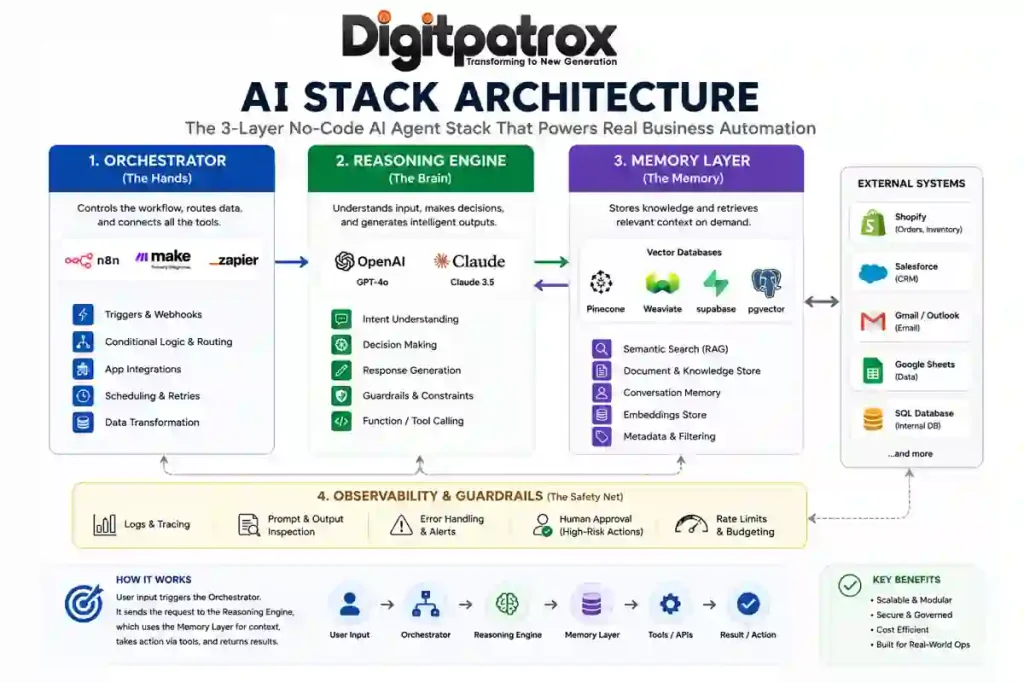
An AI workflow executes a fixed, predictable path. An AI agent has the autonomy to choose its own tools and loop until a specific goal is met.
Most businesses honestly do not need an autonomous agent on day one. They need basic workflow automation. We broke down this distinction heavily in our comprehensive look at AI workflows vs AI agents. An agent is really only required when inputs are highly unpredictable.
An Operational War Story
To show you what I mean, one Shopify apparel brand we worked with connected GPT-4 directly to Gorgias and let it auto-process refund approvals under $75 without a human in the loop.
It worked perfectly for about 11 days. Then a customer sent in a ticket that combined a damaged-item complaint with a delayed-shipment issue for two separate items in the same email. The agent interpreted the interaction as two entirely separate refund events and duplicated the payout to the customer.
The model wasn’t the problem. The missing guardrail was.
The No-Code AI Infrastructure Stack
To build this without code, you need three distinct layers.
1. The Orchestrator
This is your control layer. Zapier vs Make vs n8n is usually the core debate here. Zapier is fine for simple point-to-point tasks. I still think Make.com is one of the fastest ways to prototype AI automation, but honestly, once a scenario grows beyond a few dozen modules the visual debugging experience becomes miserable. For real agents that need conditional routing and deep control, n8n is usually the default choice for technical operators. We outlined a step-by-step implementation of this in this deep dive on n8n and MCP.
2. The Brain
This is the reasoning engine. Just plug in OpenAI’s API or Anthropic’s Claude. They read the text and generate the response.
3. The Memory Layer
If you skip this, your agent will forget user inputs within a few conversational turns. You need a searchable memory system. You can use a managed service like Pinecone, or just run a standard Postgres instance with pgvector if you want to keep it in-house. Understanding how AI memory actually works is what separates a toy from a business tool.
The “Context Ceiling” and Bizarre Edge Cases
Visual builders often hide the memory limits of the underlying AI models. When a conversation gets too long, the platform just silently deletes the oldest messages. The agent loses its core instructions and derails the entire interaction.
But sometimes the opposite happens-the agent remembers too much of the wrong thing. One support agent we saw started issuing refunds because the phrase “I never received it” appeared buried inside the quoted email history from a completely different ticket three months prior. The LLM interpreted the historical context at the bottom of the email thread as a brand new claim.
Because models have a limited context window, you have to use RAG (Retrieval-Augmented Generation) to search documentation for the exact paragraph needed, feeding only that specific chunk to the AI. Master the context window vs RAG tradeoff, and force your system to only look at the most recent, relevant messages.
Why Observability Is Basically Everything
I cannot stress this enough: if you aren’t using something like Langfuse or Helicone to trace your runs, you are flying completely blind.
Competitors will tell you to compare UI slickness, but when you are 30 days into deployment, you are going to care about exactly one thing: figuring out why the bot did something stupid. When a user complains about a bad interaction, you need detailed AI observability tools to inspect the exact prompt that went to the LLM, the exact data that was retrieved from your vector DB, and the raw generation history.
Visual builders will often show a “green checkmark” because the API call technically succeeded, but the LLM might have outputted total garbage. If you don’t have trace logs, you will never figure out why it broke. Route high-risk decisions to a Slack channel with “Approve” or “Reject” buttons until you actually trust the logs.
The 6-Month Reality Check
You skip writing code upfront, which feels great, but then you spend six months untangling visual workflows nobody wants to touch. Three months after deployment, your team is going to be terrified to modify the Make.com canvas because nobody remembers how the web of lines actually works.
Third-party tools silently change how their endpoints behave, breaking your modules without warning. As I mentioned earlier, prompts that worked perfectly in January yield slightly different formatting in June due to unannounced model updates.
The Master Decision Matrix
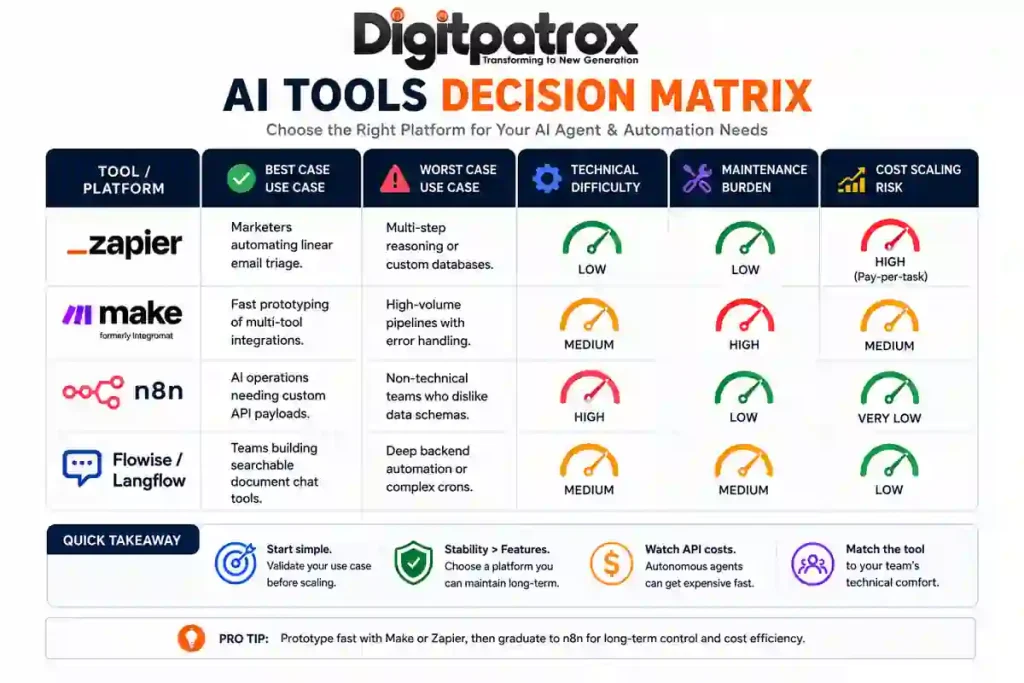
| Tool / Platform | Best Case Use Case | Worst Case Use Case | Technical Difficulty | Maintenance Burden | Cost Scaling Risk |
| Zapier Central | Automating linear email triage. | Multi-step reasoning or custom databases. | Low | Low | High (Pay-per-task) |
| Flowise / Langflow | Building searchable document chat tools. | Deep backend automation or complex crons. | Medium | Medium | Low |
| Make.com | Fast prototyping of app integrations. | High-volume pipelines with error handling. | Medium | High | Medium |
| n8n | Operations needing custom API payloads. | Teams who refuse to look at raw JSON. | High | Low | Very Low |
FAQ
Can I really build an AI agent without knowing how to code?
Yes, but you still have to learn how computational logic works. You don’t need to know Python syntax, but you definitely need to understand rate limits, data routing, and how JSON structures work.
Is it safe to let an AI agent update my CRM automatically?
Not initially. Have the agent draft the update and send it to a human for approval via Slack or email. Only take the training wheels off once the agent hits near-perfect accuracy over a few weeks of real-world testing.
How do I stop the agent from hallucinating?
You can’t eliminate it completely, but you control it by severely restricting the agent’s memory window and forcing it down strict paths. Check out how to reduce AI hallucinations to see how to ground the model.
Final Thought
The biggest misconception about AI agents is that they are primarily an artificial intelligence problem. They aren’t. They are an operations problem disguised as an AI product. The companies actually succeeding with this stuff aren’t building the most autonomous, flashy systems. They are building the most reliable, boring ones.